
How to Avoid Carpal Tunnel When Typing: 3 Habits
Learning how to avoid carpal tunnel when typing mostly comes down to doing less of the repetitive work and doing it in better positions. Here are three habits: pace your breaks, fix the basics of your setup, and cut the keystrokes you don't need to make.
Key Takeaways
- Short, frequent breaks and fewer keystrokes are the two habits that most reduce your typing load. This is general guidance, not medical advice.
- Posture and keyboard position matter, but they are covered in depth in our keyboard position guide, so this article only touches them.
- Dictating messages, emails and notes with the BossAI keyboard on iPhone and Android replaces typed keystrokes with speech.
- Numbness, tingling or night pain are reasons to see a clinician. This article does not diagnose or treat anything.
Contents
- What Causes Carpal Tunnel When Typing?
- How to Avoid Carpal Tunnel When Typing All Day?
- How Often Should I Take Breaks to Prevent Carpal Tunnel While Typing?
- How to Avoid Carpal Tunnel When Typing: Does Keyboard Setup Help?
- Can Dictation Reduce the Typing That Strains Your Wrists?
- Where Dictation Fits Into a Lighter Typing Day
- Get Started with BossAI
- FAQ
What Causes Carpal Tunnel When Typing?
Carpal tunnel syndrome happens when the median nerve is squeezed as it passes through the narrow carpal tunnel in your wrist. Typing is linked to it through long stretches of repetitive finger movement and bent wrist positions, though research on typing as a direct cause is mixed and other factors matter too.
That mixed picture is worth knowing. Genetics, health conditions and wrist anatomy all play a role, so typing is rarely the only suspect. If you want the evidence laid out, see our breakdown of whether typing can cause carpal tunnel syndrome and the longer piece on carpal tunnel from typing.
What you can control is load. Fewer repetitions, fewer awkward angles and more rest between bursts are the levers that every desk guide ends up recommending.
Reality check: Nobody can promise that a habit will prevent carpal tunnel. These steps lower strain on your hands. They don't guarantee an outcome.
How to Avoid Carpal Tunnel When Typing All Day?
Combine three habits: take short breaks before your hands complain, keep your wrists in a neutral position, and reduce how many keystrokes you type in the first place. No single trick covers it. Together they lower the repetitive load that heavy typists put on their hands and wrists.
Most advice you'll find ranks well on the first two. Desk accessories, posture charts and stretching routines fill the top search results. The third habit gets far less attention, and it's the one that scales with how much you write.
| Habit | What it changes | Effort |
|---|---|---|
| Timed breaks | Gives hands a rest between bursts | Low: a timer |
| Neutral wrist setup | Reduces bent-wrist time | Medium: one-time setup |
| Fewer keystrokes | Cuts the total amount typed | Medium: a new input habit |
Here's how each one works in practice.
How Often Should I Take Breaks to Prevent Carpal Tunnel While Typing?
Take a short break roughly every 20 to 30 minutes of continuous typing, and make it a real one: hands off the keyboard, wrists loose, a few seconds of gentle shaking out. Many ergonomic guides suggest a rhythm like this, but there is no single clinically proven interval.
Pick a cadence you will actually follow. A timer on your desk or phone beats good intentions, because focused writing is exactly when you forget your hands exist. Stand up and refill your water during the pause, and you've bundled two habits into one.
 A timer, a glass of water and hands off the keys: small breaks are easier to keep when the cues are on your desk.
A few things make breaks stick:
- Set a repeating timer instead of relying on memory.
- Pair each break with something you already do, like a drink or a stretch.
- Switch tasks when you can. Reading or calling gives your hands a shift off the keys.
- Break earlier on high-volume days, not later.
If your wrist already hurts when you type, don't just push through the timer. Our guide on what to do when your wrist hurts when typing covers symptom-first fixes, and a clinician is the right call for anything persistent.
Quick win: Tie your break to something that ends naturally, such as sending an email. You'll skip fewer breaks than if you tie them to the clock.
How to Avoid Carpal Tunnel When Typing: Does Keyboard Setup Help?
Yes, setup can help. Keeping wrists roughly straight, forearms supported and the keyboard low and level reduces how much your wrists bend while you type. Research on wrist posture and carpal tunnel pressure points the same way, so setup is a sensible baseline habit.
We won't repeat the full walkthrough here. The details of height, angle and distance live in our keyboard position for carpal tunnel guide.
Two add-ons come up constantly. A wrist rest can help you rest your palms between bursts, and we cover when it earns its place in keyboard wrist rest for carpal tunnel. Braces and gloves are a separate question, which we cover in carpal tunnel gloves for typing.
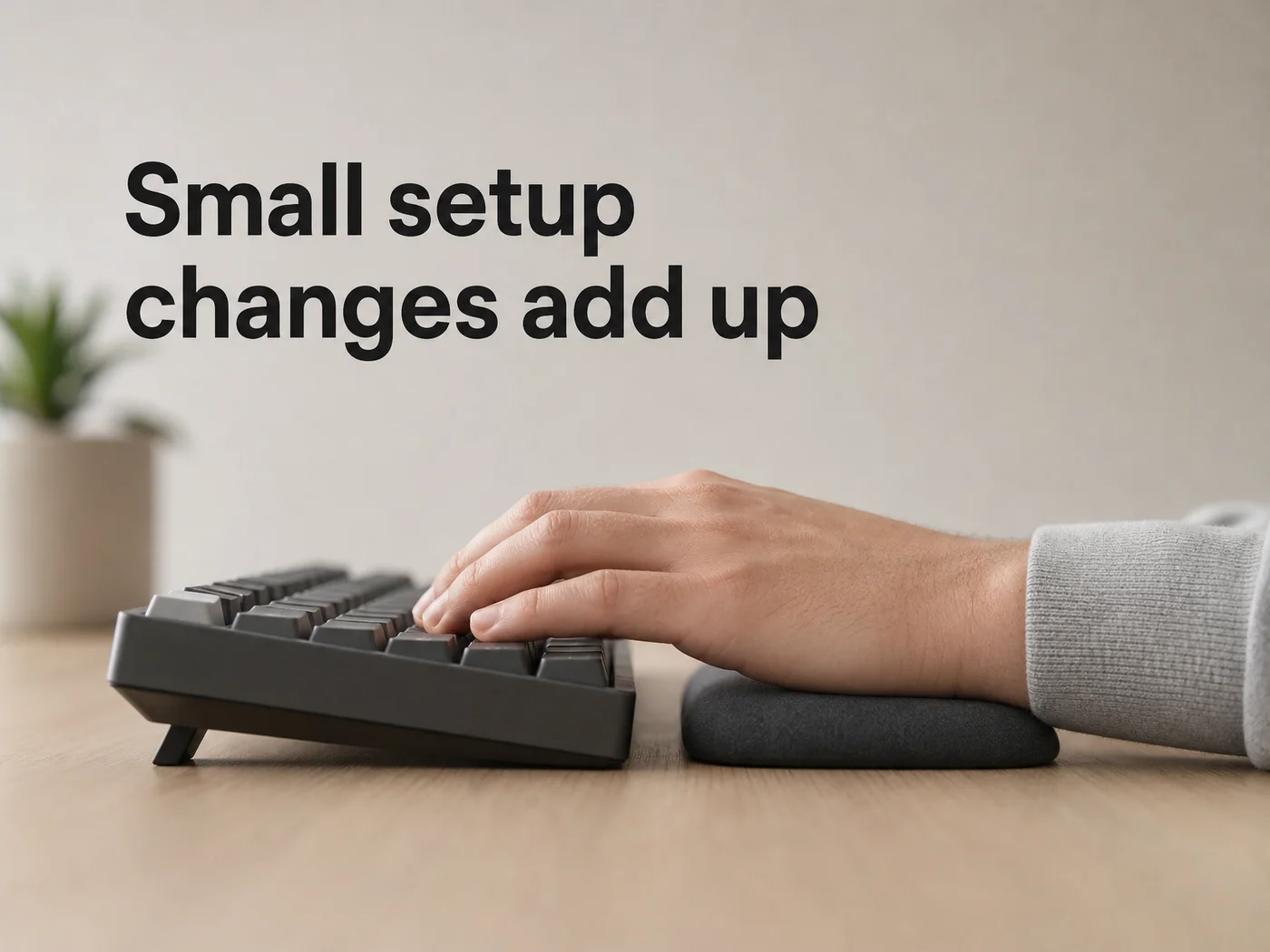 Setup changes are small, one-time and worth doing, but they don't reduce how much you type.
Here's the limit of setup. A perfect desk still leaves you with the same number of keystrokes at the end of the day. That's where the third habit comes in.
Can Dictation Reduce the Typing That Strains Your Wrists?
Yes, dictation can reduce typing because spoken words replace typed keystrokes. Writing a message by voice means fewer finger movements across the day. It won't fix a setup problem or treat symptoms, but for text-heavy work it is one of the few habits that removes load.
Think about what you type in a normal day. Replies, emails, chat messages, notes, quick follow-ups. Most of that is short, conversational text that people can speak faster than they type, which makes it a good fit for dictation.
Where it works less well: precise edits, code, anything you'd rather type letter by letter. Keep the keyboard for those and dictate the rest. If you're coming back to work after a procedure, our guide to typing after carpal tunnel surgery covers working with little or no typing.
What this means for you: You don't have to give up the keyboard. Moving even your routine replies to voice shrinks the pile you type each day.
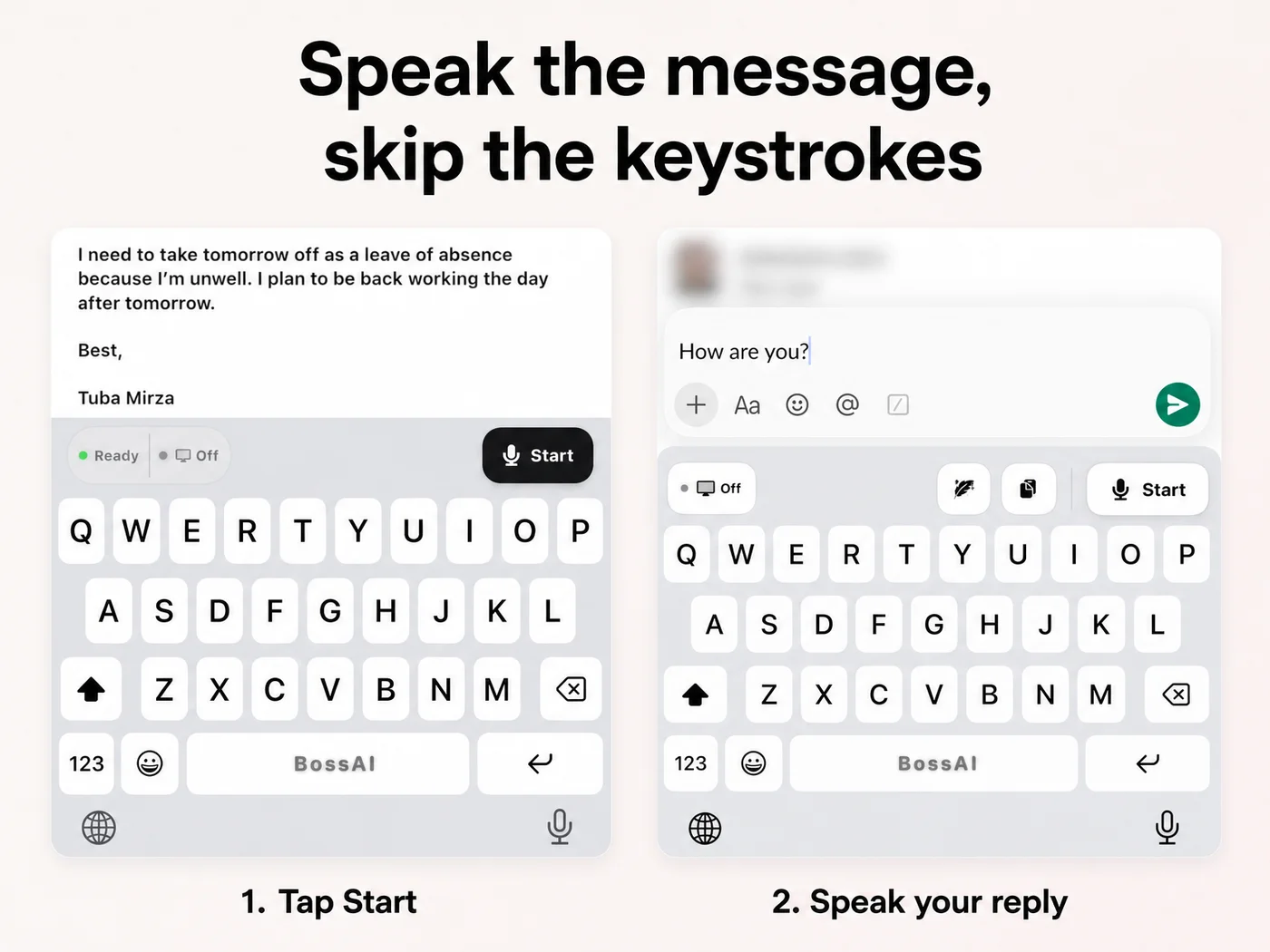 The BossAI keyboard in email and Slack: tap Start, speak, and the text lands in the field.
Where Dictation Fits Into a Lighter Typing Day
The BossAI keyboard puts dictation inside the keyboard you already use on iPhone and Android, so you don't open a separate app. The screenshots above show the real layout. In the email compose screen, a black Start button sits at the top right of the keyboard, and in Slack the same Start control appears in the keyboard's top row.
Here's the flow. Tap Start, say your message, and BossAI transcribes it into the text field while removing filler words and fixing grammar and punctuation. The email in the first screenshot is a short leave request that reads as a finished message.
A practical split for a typing-heavy day:
- Dictate: email replies, chat messages, status updates, notes to yourself.
- Type: short edits, passwords, code and anything that needs exact characters.
- Tap, don't retype: use Clips to paste a signature or a standard reply with one tap instead of typing it again.
Because Android has the same features as iOS, the same approach works on either phone. BossAI is a keyboard for iPhone and Android and a hotkey voice-to-text app on Mac and Windows. To be clear about what it is: a way to type fewer words, not a medical product, and it doesn't prevent or treat carpal tunnel.
Get Started with BossAI
If your day is full of replies and messages, moving some of them to voice is the easiest keystroke cut you can make. BossAI has a free plan with 500 words of dictation a day, so you can try it on real work before deciding anything.
FAQ
Can you avoid carpal tunnel if you type all day?
Not with certainty, but you can lower your risk factors. Take regular short breaks, keep wrists straight and supported, and reduce how many keystrokes you type. If you notice numbness or tingling, see a clinician rather than relying on habits alone.
Should I wear a carpal tunnel brace while typing?
That's a decision for a clinician, not a general rule. Some people are advised to wear one, but a brace isn't a substitute for breaks and setup. Our guide to carpal tunnel gloves for typing explains the options and their limits.
Do wrist rests help prevent carpal tunnel?
They can help you rest your palms between bursts of typing, but they should not be used while your hands are actively moving across the keys. Used wrongly, they can add pressure. See keyboard wrist rest for carpal tunnel for how to use one.
Is BossAI free?
Yes, there's a free plan. It gives you 500 words of dictation a day, which resets daily, plus one Boss Mode reply, one Rewrite and two Clips. Pro removes the limits at $9.99 a month or $69.99 a year, and a 7-day Pro trial needs no account.
Can BossAI help if I'm trying to type less because of wrist strain?
BossAI lets you dictate messages, emails and notes instead of typing them, so you press fewer keys. It's a way to reduce keystrokes, not a treatment. For symptoms like numbness or pain, talk to a clinician about what's right for you.
Which platforms does BossAI support?
BossAI works on iPhone and Android as a full keyboard, and on Mac and Windows as a voice-to-text app. On iPhone, you can also start dictation straight from the Action Button, or with Back Tap on older models, without opening the app first.