

Tamil Voice Typing on iPhone & Android: Setup Guide
Open BossAI's language settings and the Spoken Language row reads "Auto detect". It is a sensible default for common languages. For Tamil, the app's own note says to pick the language yourself, and that one change is most of this guide.
Below you get the setup for iPhone and Android, an honest look at where Tamil dictation still trips up, and a plan for mixing Tamil with English.
What Is Tamil Voice Typing?
Tamil voice typing means speaking Tamil aloud and having your phone write it as Tamil text, in any field where you would normally type. It replaces the Tamil keyboard layout with speech recognition. You talk; the words appear at the cursor, ready to send or edit.
Most search results for this phrase are single-purpose tools: a browser page with a microphone button, or a Play Store app that only does Tamil. Those work for pasting a paragraph somewhere. They do not follow you into WhatsApp, Gmail or your notes app.
A voice keyboard is different because it lives where you type. If that idea is new, how a voice typing keyboard works covers the mechanics.
Related: No Permission to Enable Voice Typing: Android Fixes
Related: Gboard Voice Typing vs AI Keyboard: What Changes
How Do I Turn On Tamil Voice Typing on My Phone?
To turn on Tamil voice typing, install a voice keyboard such as BossAI, enable it as a keyboard, then open Settings > Language > Spoken Language and choose Tamil instead of Auto detect. After that, tap the mic in any app and speak. The setting applies to every dictation.
The Spoken Language row sits at the top of the Settings screen, under the Language heading. Its description is plain: "Language you speak while recording". Right below it is Output Language, which defaults to "Same as spoken", meaning Tamil speech comes out as Tamil text.
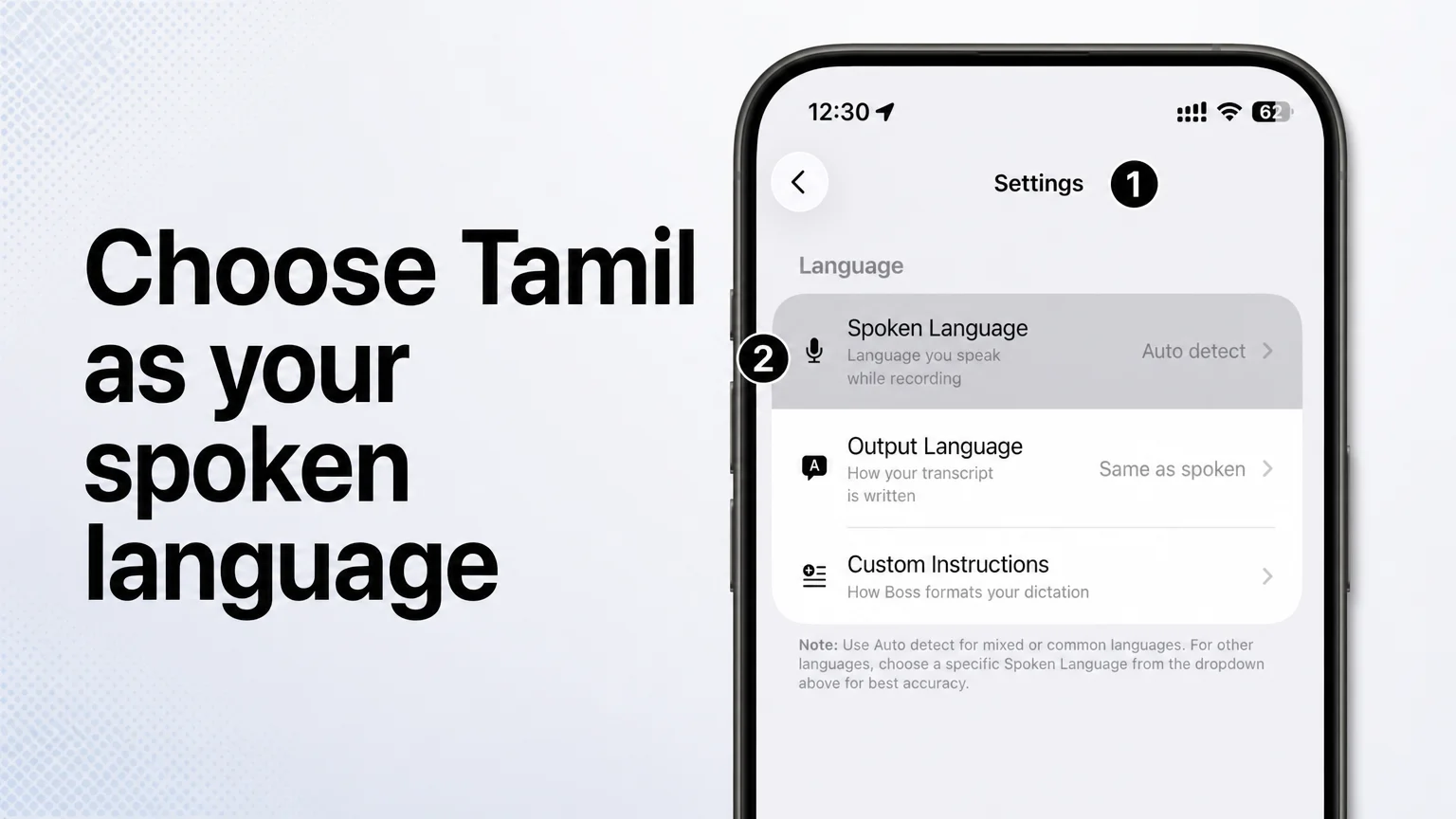 The Spoken Language row is where you replace Auto detect with the language you actually speak.
That screenshot shows the default, Auto detect, not Tamil. The note beneath the rows is the useful part: use Auto detect for mixed or common languages, and for other languages choose a specific Spoken Language from the dropdown for best accuracy.
On iPhone
- Install BossAI and add it under Settings > General > Keyboard > Keyboards.
- Open the BossAI app, go to Settings, and tap Spoken Language.
- Choose Tamil from the list.
- In any app, switch to the BossAI keyboard and tap the mic.
You can also skip opening anything first. On iPhone, dictation starts straight from the Action Button, or with Back Tap (a double-tap on the back) on older models.
On Android
The Android app is a full keyboard with the same feature set as iOS, including languages. Install it, enable it as an input method, and look for the same Spoken Language setting to select Tamil. If Android's own voice input is giving you trouble first, talk to text on Android walks through the platform side.
Where Tamil Voice Typing Still Struggles
Tamil voice typing still struggles with casual spoken Tamil, regional speech differences, names and English words dropped mid-sentence. Tamil is a language where the way people talk differs a lot from the way people write, and any speech engine has to bridge that gap.
We are not publishing an accuracy figure for Tamil, because we have not measured one we could stand behind. What we can say is where to expect friction, based on how the language works:
- Spoken versus written Tamil. Everyday speech uses forms that formal writing does not, so a transcript may come out more formal or more literal than you meant.
- Regional speech. Tamil is spoken across Tamil Nadu, Sri Lanka, Singapore, Malaysia and the diaspora, with different pronunciations and vocabulary.
- Long, joined-up words. Tamil builds meaning by attaching endings to words, so one misheard sound can change a whole word.
- Names and places. Proper nouns, brands and street names are the first things to check.
- Numbers and dates. Spoken numbers can land as words or digits; scan them before sending.
Reality check: Dictate three or four of your own typical sentences before you rely on any Tamil voice tool, ours included. Your accent and vocabulary decide the result, not a feature list.
The same logic applies to sibling languages. If you also write in Malayalam, expect a similar set of trade-offs there.
Mixing Tamil and English in One Sentence
You can try, but treat it as an experiment rather than a guarantee. BossAI's in-app guidance is to use Auto detect for mixed languages and to turn Autocorrect off when you mix them. With a single Spoken Language chosen, expect the engine to favour that language.
That points to a practical choice between two modes:
- Mostly Tamil with the odd English word: set Spoken Language to Tamil and fix the English words by hand.
- Truly mixed speech: try Auto detect, and check how it handles the switch points.
The keyboard settings give a hint about the second case. Autocorrect carries the note "Turn off for mixed languages like Hinglish", and Tamil-English mixing is the same kind of problem. Autocorrect tends to fight a language it does not expect.
Tamil Voice Typing Beyond India
Tamil speakers live in the UK, Canada, the US, the UAE and Australia, and plenty of them message family in Tamil and colleagues in English. Switching keyboard layouts between the two is slow. Speaking skips the layout hunt, which makes it easier to keep Tamil in your daily messages instead of defaulting to English.
Output Language is useful here. It defaults to "Same as spoken", but you can set another output language when you speak Tamil and need the text in a different one. For the broader picture across many languages, see the multilingual voice typing guide.
 Because dictation happens in the keyboard, the same Tamil setting follows you from app to app.
How Does BossAI Handle Tamil Voice Typing?
BossAI handles Tamil through its speech engines, Deepgram Nova-3 and Gladia Solaria-1, which together cover 99 languages including Tamil. It runs as a keyboard on iPhone and Android, so Tamil dictation works in any app where you can type.
On the Android side, the voice keyboard Android users rely on shows how the keyboard behaves day to day. The features that matter for Tamil are the ones around the dictation itself:
- Spoken Language and Output Language let you set what you speak and how it is written.
- Instant Recording starts recording as soon as you tap the mic, if you turn it on.
- Custom Dictionary is the place for names you keep having to correct.
- Rewrite reworks a message you have dictated, in a chosen tone, with one tap.
Free Plan: Pick Tamil as Your One Language
Is Tamil voice typing free on BossAI? Yes, within limits. The free plan includes 500 words of dictation a day, resetting daily, and one dictation language. Pro unlocks all languages, and a 7-day full Pro trial needs no account.
Think of the one-language limit as a decision rather than a restriction: pick Tamil, and every dictation uses it. If you later want to dictate in Hindi, Telugu or Kannada as well, that is what Pro is for.
Quick recap
- Change Spoken Language from Auto detect to Tamil before you start.
- Output Language stays "Same as spoken" unless you want text in another language.
- Check names, numbers and English words in every transcript.
- For mixed Tamil and English, test Auto detect and consider turning Autocorrect off.
- Free plan: 500 words a day and one language, which can be Tamil.
Get Started with BossAI
Set Tamil once and dictate in any app on your phone. The free plan is enough to test your own sentences before deciding anything.
FAQ
How do I type in Tamil with my voice on Android?
Install a voice keyboard such as BossAI, enable it as your input method, set the spoken language to Tamil in its settings, and tap the mic in any app. The Android app has the same features as the iPhone version, including language selection.
Does Tamil voice typing work on iPhone?
Yes. With BossAI you add it as a keyboard, set Spoken Language to Tamil, and dictate in any app. You can start dictation from the Action Button, or with Back Tap on older iPhones, without opening the app first.
What is BossAI?
BossAI is a voice keyboard for iPhone and Android, and a hotkey voice-to-text app for Mac and Windows. It turns speech into text, removes filler words, offers one-tap rewrites in six tones, and has Boss Mode, which reads your screen to help write replies.
Which languages does BossAI support besides Tamil?
BossAI supports the languages covered by its two speech engines, 99 in total. Indian languages include Hindi, Telugu, Bengali, Marathi, Gujarati, Kannada, Malayalam, Punjabi and Urdu. The free plan includes one language; Pro unlocks all of them.
Is Tamil speech to text accurate?
It depends on your accent, vocabulary and how casual your speech is. We do not quote a Tamil accuracy figure. Test a few of your own sentences, check names and numbers, and correct as you go.