
Best Android Keyboard in 2026: Six Options Compared
Most lists of the best Android keyboard rank apps by how well they swipe. That test made sense when typing was the only way in. In 2026 the more useful question is how fast a keyboard gets words onto the screen, and whether it can do something with them once they are there.
This guide compares six keyboards on typing, voice, languages, themes and price, then tells you which one fits which kind of person.
Key Takeaways
- The best Android keyboard depends on what you optimize for: familiar typing (Gboard, Samsung Keyboard), prediction (SwiftKey), customization (Fleksy), privacy (FUTO, OpenBoard), or speaking instead of typing (BossAI).
- Gboard, SwiftKey and Samsung Keyboard cover everyday typing for free. An AI voice keyboard adds filler-word cleanup, one-tap tone rewrites and screen-aware replies on top of that.
- BossAI is on Android with the same feature set as iOS: dictation, Boss Mode, Rewrite, Clips, Custom Dictionary, Knowledge Base, languages and themes.
- If you write in Hindi, Tamil, Telugu, Marathi or mix languages, pick a keyboard whose speech engine lists your language explicitly.
- Switching is cheap: install from Google Play, enable it in keyboard settings, then change keyboards from the icon that appears while typing.
Contents
- What Is the Best Keyboard for Android in 2026?
- Which Android Keyboard Features Matter Most?
- How Does Voice Typing Compare to Traditional Android Keyboards?
- What's the Best Android Keyboard if You Type in Multiple Languages?
- Does the Best Android Keyboard Have Dark Mode?
- How Much Does It Cost to Get the Best Keyboard for Android?
- Which Android Keyboard Should You Choose?
- How Do I Install and Switch to a New Keyboard on Android?
- FAQ
What Is the Best Keyboard for Android in 2026?
There is no single best Android keyboard, but there is a best one per job. Gboard or Samsung Keyboard suit people who want zero setup, SwiftKey suits heavy predictive typists, Fleksy suits customizers, FUTO suits privacy purists, and BossAI suits anyone who would rather speak than type.
Android's open keyboard system is the reason this list exists at all. Unlike iPhone, where third-party options are more constrained, Android lets any app act as your keyboard system-wide. If you are curious how the other side works, our notes on the third-party keyboard options on iPhone and the best keyboard apps for iOS show the contrast.
Here is the short version of the field:
| Keyboard | Best for | Voice input | Standout trait |
|---|---|---|---|
| Gboard | Everyday typing, no setup | Built-in voice typing | Google's own keyboard; free |
| Microsoft SwiftKey | Next-word prediction | Voice typing available | Learns your phrasing; themes |
| Samsung Keyboard | Galaxy phone owners | Built-in voice input | Preinstalled, tuned to One UI |
| BossAI | Dictating and replying by voice | AI dictation with cleanup | Boss Mode, Rewrite tones, Clips |
| Fleksy | Layout customization | Limited focus | Extensions and themes |
| FUTO Keyboard | Privacy and on-device voice | Offline voice input | Built around local processing |
The notes above describe each keyboard's positioning, not benchmark results. Features and terms change between releases, so confirm current details on each Google Play listing before you commit.
Which Android Keyboard Features Matter Most?
Five features decide most keyboard choices: typing accuracy and autocorrect, next-word prediction, voice input quality, language coverage, and customization such as themes and layout. Rank them by how you actually use your phone, because a feature you never touch is not worth a trade-off.
Typing accuracy is table stakes. Every keyboard in the table above gets the basics right, so the differences show up at the edges: how it handles names, slang, and code-switching between languages.
Then there is what the keyboard does beyond typing. That is where the field has moved.
- Voice input: speech recognition that writes clean sentences, not raw transcripts.
- Text expansion: saved snippets you can paste in one tap.
- Editing tools: tone changes and rewrites without leaving the app.
- Personal vocabulary: a custom dictionary so names and jargon stop getting autocorrected.
Common mistake: choosing a keyboard purely on theme packs. Themes are a five-minute decision. Dictation quality and autocorrect behavior are what you live with all day.
BossAI's keyboard toolbar shows the "beyond typing" idea in one row. The screenshot below is the BossAI keyboard open in a Slack channel: a toggle on the left reading "Off", a feather icon for Rewrite, a clips icon, and a Start button for the microphone, all above the normal QWERTY keys. That capture comes from our iOS build; the Android app carries the same feature set.
How Does Voice Typing Compare to Traditional Android Keyboards?
Voice typing is generally the fastest way to enter long text on a phone, because speaking is quicker than tapping on a small screen. The catch with built-in voice typing is cleanup: raw transcripts keep fillers and stumble on punctuation, so you often edit afterward.
Standard keyboards treat voice as a side feature, usually a microphone key that dumps a transcript into the box. That works for a one-line text. It gets tedious for emails, where you then fix grammar and punctuation by hand.
An AI voice keyboard changes the order of operations. You speak, and the keyboard removes filler words, fixes grammar, adds punctuation and formats the result for the app you are in. BossAI's processing runs about 300 ms after you stop speaking, and the words appear as you talk.
 Same phone, same message: tapping it out versus saying it out loud.
Boss Mode goes a step further. Say "Boss, reply to this message confirming Friday" and BossAI reads what is on your screen and writes the reply in the open text field. That is the part no standard keyboard does. We go deeper on Android speech engines in our guide to a dictation app for Android.
Worth knowing: BossAI is cloud-processed and does not have a local or offline mode. If you need voice input with no network at all, FUTO is built for that and BossAI is not.
If you prefer to listen rather than speak, that is a different tool entirely; see our write-up on a text to speech app for Android.
What's the Best Android Keyboard if You Type in Multiple Languages?
For multilingual typing, pick a keyboard whose speech engine names your languages explicitly and lets you mix them. BossAI runs on Deepgram Nova-3 and Gladia Solaria-1, which together cover 99 languages, including Hindi, Tamil, Telugu, Bengali, Marathi, Gujarati, Kannada, Malayalam, Punjabi and Urdu.
Most Indian readers switch between English and a regional language mid-sentence. In BossAI, Spoken Language can be set to Auto detect, which the app recommends for mixed or common languages, or to one specific language for best accuracy. Output Language controls how the transcript is written, and "Same as spoken" is the default.
One setting is worth knowing if you write Hinglish: the app suggests turning autocorrect off for mixed languages, because autocorrect fights code-switching.
Two honest limits. The free plan includes one dictation language and Pro unlocks all of them. And we do not publish per-language accuracy figures, so test your own language on the 7-day trial before paying.
For Gboard, SwiftKey and Samsung Keyboard, check each keyboard's language list in its settings; all three support multiple languages, and you can add them in the keyboard's Languages menu.
Does the Best Android Keyboard Have Dark Mode?
Yes. Modern Android keyboards can show a dark appearance, either by following your phone's system dark theme or through a theme you pick inside the keyboard. The exact switch lives in each keyboard's own theme settings, so check there if the keyboard stays light.
Two things control it. Your phone's system appearance (Settings → Display) sets the baseline for many apps. Keyboards that ship theme packs then let you override that with a fixed dark or colored look.
Gboard, SwiftKey and Samsung Keyboard all offer theme options in their settings. BossAI includes themes too; the free plan has one, and Pro unlocks all of them.
How Much Does It Cost to Get the Best Keyboard for Android?
Most Android keyboards are free to install. Gboard, SwiftKey and Samsung Keyboard cost nothing, while AI voice keyboards usually meter their free tier. BossAI's free plan covers 500 words of dictation a day, and Pro is $9.99 a month, $69.99 a year, or $149.99 once.
Here is what the BossAI free plan includes each day:
- 500 words of dictation, resetting daily at full AI quality
- One full Boss Mode reply and one Rewrite
- Two Clips and ten Custom Dictionary words
- One language and one theme
Pro removes every limit, adds all six tones (Professional, Casual, Witty, Persuasive, Empathetic and Bold) plus custom tones, and covers iOS, Android, macOS and Windows under a single subscription. There is a 7-day full Pro trial, and no account is needed.
Reality check: free keyboards cost you nothing but the editing time. A paid voice keyboard only earns its price if you dictate enough that the cleanup savings add up. The free daily 500 words is the honest way to find out.
Compared with other AI dictation tools, the field runs roughly $8 to $15 a month. Typeless is the other major AI dictation keyboard on Android; BossAI's differentiators are screen-aware Boss Mode, Clips and one-tap tone Rewrite.
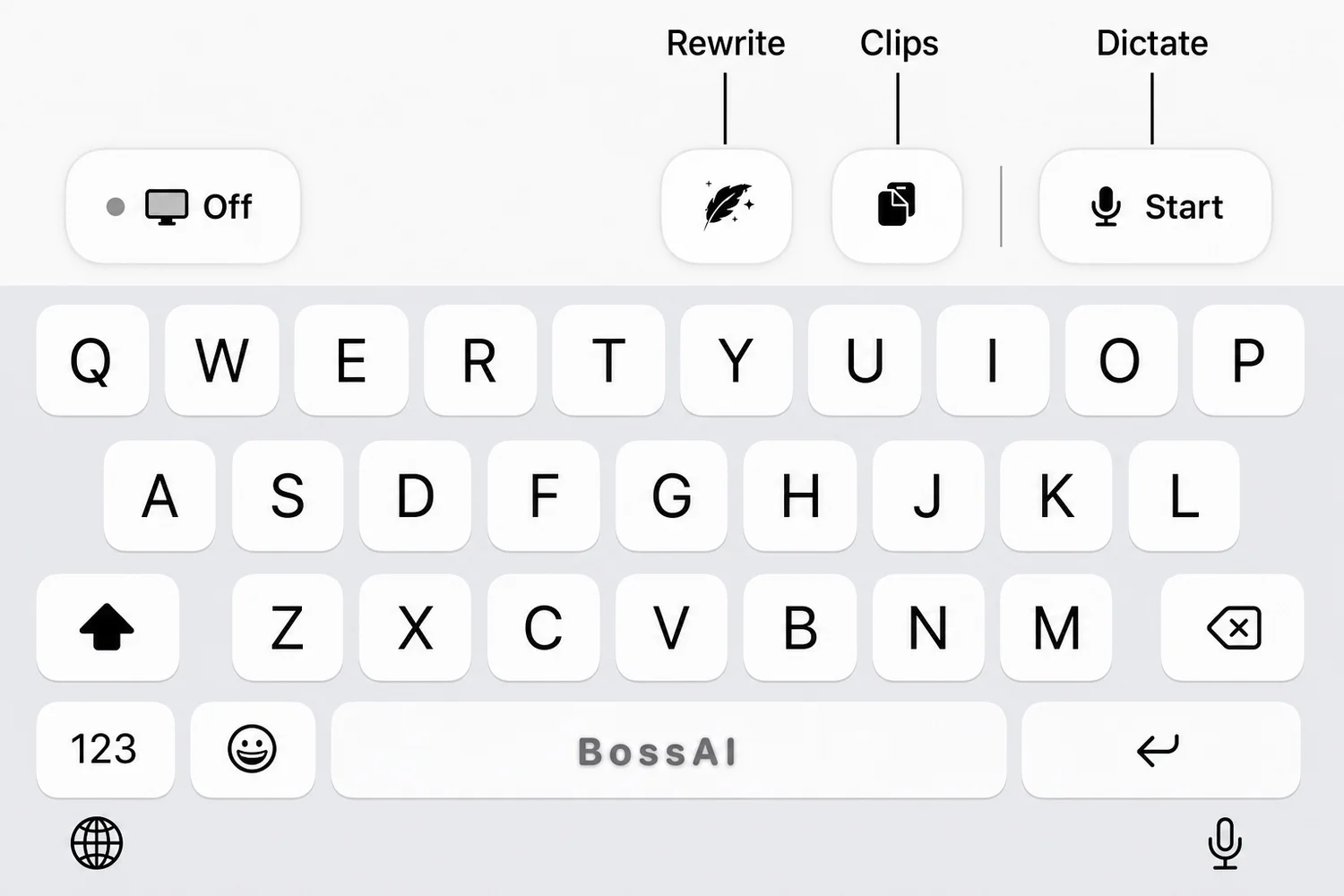 The BossAI toolbar above the keys: Rewrite, Clips and the Start button for dictation.
Which Android Keyboard Should You Choose?
Choose by habit. Stay with Gboard or Samsung Keyboard if you mostly tap short messages, try SwiftKey if prediction matters, go FUTO if privacy decides it, and choose BossAI if you write emails, chats and long messages and want to speak them.
Match your situation to a pick:
- You type short texts and rarely switch apps: your built-in keyboard is fine.
- You write a lot and edit a lot: an AI voice keyboard saves the editing step.
- You reply to email and Slack all day: Boss Mode reads the thread and drafts the answer.
- You repeat the same text (address, links, signature): Clips pastes it in one tap.
- You need offline voice: FUTO.
 Every keyboard here installs from Google Play, so trying two or three costs you nothing.
You do not have to commit. Keyboards install side by side, so keep your current one, try BossAI for a week, and switch back with two taps if it does not stick.
How Do I Install and Switch to a New Keyboard on Android?
Install the keyboard app from Google Play, enable it in your phone's keyboard settings, then pick it as the active keyboard. The settings path depends on the manufacturer: Settings → System → Keyboard on Pixel, Settings → General management → Keyboard on Samsung.
The steps are the same for any keyboard:
- Install the app from Google Play.
- Open the keyboard's setup screen and tap to enable it in your phone's keyboard list.
- Open any text field and choose the new keyboard from the keyboard switcher that appears.
- Grant microphone permission if you want voice input.
BossAI follows this path and works in any app's text field as a full replacement for Gboard or Samsung Keyboard. If you keep a second keyboard installed, the switcher lets you jump back whenever you need it.
Get Started with BossAI
If you want the Android keyboard that lets you speak your messages and have them cleaned up on the way in, BossAI is free to try with a daily 500-word allowance.
FAQ
What is the best Android keyboard?
There is no single winner. Gboard and Samsung Keyboard suit simple typing, SwiftKey suits prediction, FUTO suits privacy, and BossAI suits voice-first writing with AI cleanup. Pick based on whether you mainly tap, customize, protect data, or dictate.
Is Gboard better than SwiftKey?
Neither wins everywhere. Gboard is Google's own keyboard and the default on many phones, while SwiftKey is Microsoft's and leans on next-word prediction. Install both, use each for a few days, and keep whichever predicts your phrasing better.
Is BossAI free on Android?
Yes, with limits. The free plan gives you 500 words of dictation a day that resets daily, one Boss Mode reply, one Rewrite, two Clips and one language. Pro removes the limits at $9.99 a month, $69.99 a year or $149.99 lifetime, with a 7-day trial.
Does BossAI work on Android?
Yes. BossAI installs from Google Play as a full keyboard and carries the same feature set as the iPhone app: dictation, Boss Mode, Rewrite, Clips, Custom Dictionary and Knowledge Base. It also runs on iOS, macOS and Windows, covered by one Pro subscription.
Can I use more than one keyboard on Android?
Yes. Android lets you enable several keyboards at once and switch between them from the keyboard switcher while typing. That makes it easy to keep your default and trial a new one without removing anything.
Which Android keyboard supports Indian languages?
Gboard, SwiftKey and Samsung Keyboard each list Indian languages in their settings. BossAI's speech engines cover Hindi, Tamil, Telugu, Bengali, Marathi, Gujarati, Kannada, Malayalam, Punjabi and Urdu, and the app has an Auto detect option for mixed-language speaking.