
Keyboard for Rheumatoid Arthritis: What Actually Helps
Keyboard for Rheumatoid Arthritis: What Actually Helps
The best keyboard for rheumatoid arthritis is a split or low-force ergonomic model, such as the Kinesis Freestyle 2 or Logitech Wave Keys, because it keeps wrists neutral and cuts the force each keystroke needs. It still asks your finger joints to press thousands of keys a day. That is why many people with RA now pair a keyboard with voice dictation, or drop the keyboard for long writing altogether.
Wirecutter's July 2026 pick for the best ergonomic keyboard is the Logitech Wave Keys, and the Kinesis Freestyle 2 and Advantage 2 show up in nearly every roundup. Here is what each approach fixes and what it leaves untouched.
What Is the Best Keyboard for Rheumatoid Arthritis?
The best keyboard for rheumatoid arthritis is one that reduces joint load per keystroke: a split or tented layout to keep forearms and wrists neutral, light key switches that need little force, and a wrist-supporting shape. No single model is "the" answer, because RA flares change what your hands tolerate week to week.
Three features do most of the work:
- Split or tented layout. Kinesis Freestyle 2 and Advantage 2 separate the two halves so your wrists stop angling inward.
- Wave or curved key rows. Logitech Wave Keys and Logitech Ergo shape the board around the natural curve of the hand.
- Light actuation. Keys that register on a gentle press mean less force through swollen knuckles.
Arthritis Foundation guidance on office ergonomics points the same way: a keyboard and mouse that hold the hands and forearms in a neutral position.
Key Takeaways
- A split, low-force ergonomic keyboard lowers joint load per keystroke but does not reduce how many keystrokes you make.
- Voice dictation removes finger dexterity and grip from the equation for emails, messages, and documents.
- BossAI runs as a voice keyboard on iOS and Android and as a native app on macOS and Windows, working in any text field.
- Its custom instructions and custom dictionary let you set formatting and vocabulary once, so you stop fixing text by hand.
- The most sustainable setup is hybrid: dictate the high-volume writing, keep an ergonomic keyboard for short edits.
Where an Ergonomic Keyboard for Rheumatoid Arthritis Falls Short
A good board changes how your joints move. It does not change how much you type, and that second number is what hurts on a bad day.
Email, chat, notes, and documents add up. Someone answering fifty messages in a flare still presses a few thousand keys, each one a small load on inflamed finger joints. Grip and pinch strength also drop during flares, which makes even a light key feel heavy by afternoon.
Reality check: An ergonomic keyboard lowers the cost of each keystroke. Only fewer keystrokes lower the total.
Our pillar guide on rheumatoid arthritis typing covers how RA affects the joints typing relies on. Other arthritis types raise different problems, which we cover in typing with arthritis. Carpal tunnel is a separate condition, but the keyboard questions overlap, as in our piece on a keyboard wrist rest for carpal tunnel.
How Does Voice Typing Help People With Rheumatoid Arthritis?
Voice typing converts speech to text, so writing no longer depends on finger dexterity, grip strength, or wrist mobility. You speak, the words appear, and your hands can rest. For people with RA, that turns the highest-volume typing tasks into something that costs no joint load.
Built-in tools like Apple Dictation and Google voice typing do this at a basic level. The weak spot is cleanup: raw dictation keeps every "um" and "you know", and fixing it means going back to the keyboard.
That is the gap a dictation keyboard with AI cleanup closes. If you have RSI-style flare-ups in other parts of your hands, the same logic applies: like RSI pain, finger pain responds to doing less repetitive work. That includes pinky pain and joint pain alike.
Is a Voice Dictation App Better Than an Ergonomic Keyboard?
For long writing, yes: dictation avoids repetitive finger loading entirely, while a keyboard only reduces it. For short edits, passwords, and spreadsheets, a keyboard is still faster and more precise. Most people with RA do best using both, each for the tasks it suits.
| Factor | Ergonomic keyboard | Voice dictation (BossAI) |
|---|---|---|
| Finger and grip load | Reduced per keystroke | None while dictating |
| Cost | Typically from about $50 to several hundred dollars, depending on model | Free tier: 500 words/day; Pro $9.99/month |
| Best for | Short edits, numbers, shortcuts | Emails, messages, documents, notes |
| Weak spot | Total keystroke count unchanged | Needs a reasonably quiet place; edits still need a tap |
| Works on phone | No | Yes (iOS, Android keyboard) |
Keyboard prices vary widely by model and retailer. Voice has its own limits: dictating in an open office or a shared room is awkward, and punctuation-heavy work like code is slower by voice.
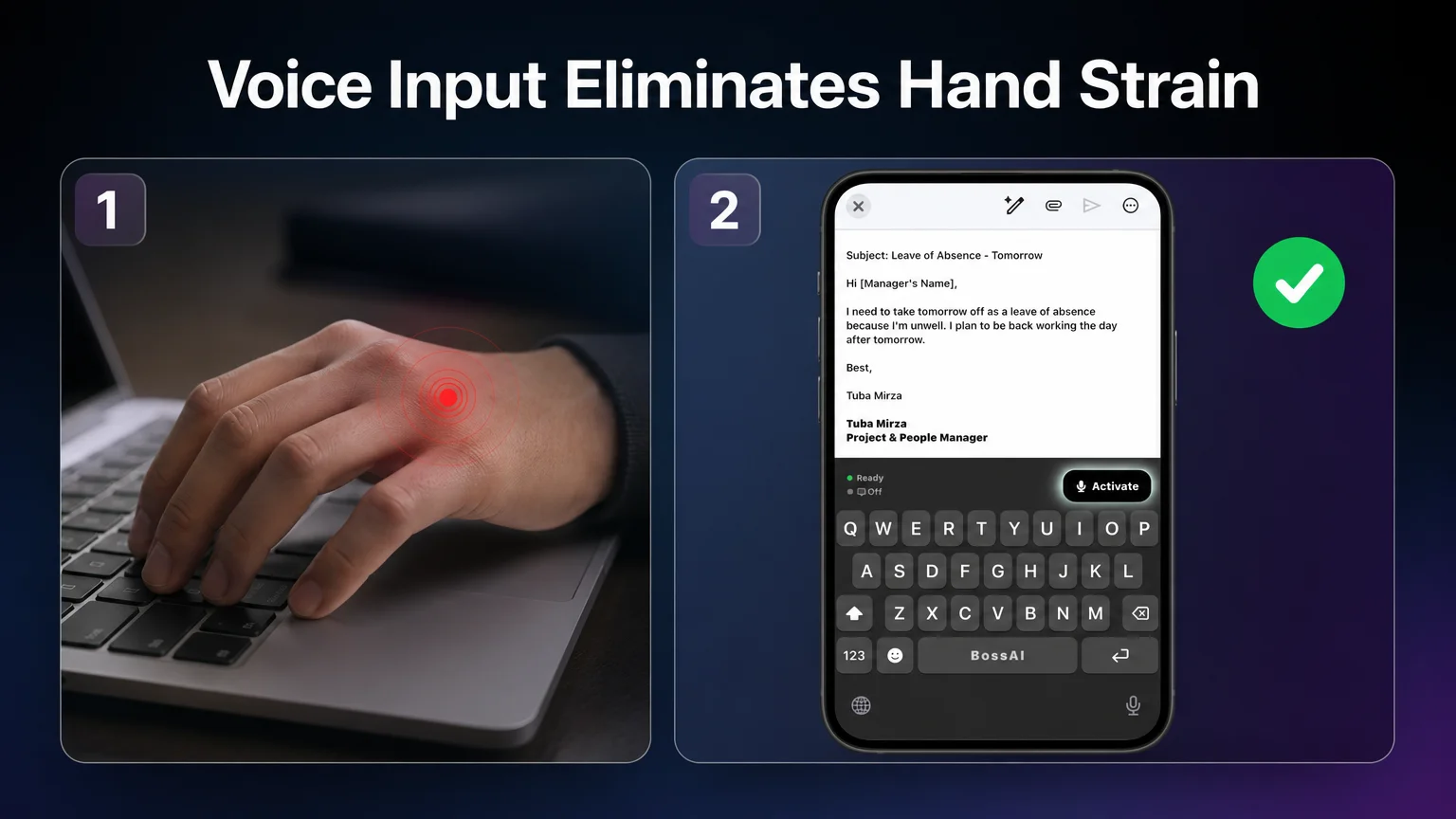 Left: the strain point on a traditional keyboard. Right: BossAI's voice mode on iOS, started from the Activate button.
How BossAI Eliminates Keyboard Pain for RA
BossAI is a voice keyboard. You speak naturally, and it transcribes in real time, removes filler words, fixes grammar, and adds punctuation, so what lands in the text field is already clean. In the screenshot above, the email draft on the right was dictated into a live compose window with the BossAI keyboard active.
Here is what matters for RA specifically:
- No typing needed for the main task. On iOS you tap Activate (or Start) once, then speak. The keyboard shows a Ready indicator, so you know it is listening.
- Works in every app. It replaces your default keyboard on iOS and Android, and runs from the menu bar on macOS and the system tray on Windows, so you don't switch tools for email versus chat.
- Custom dictionary. Add medication names, your rheumatologist's clinic, or technical terms once. Free accounts get 10 entries; Pro is unlimited.
- Custom instructions. Tell BossAI how to format your dictation, for example "never use em dashes", and it applies the rule to every dictation. This is a Pro feature.
- Clips. Save addresses, replies, and links, then paste with one tap instead of retyping them.
One honest limit: starting a recording is still a tap on iOS, and desktop use means holding a hotkey (Fn by default on Mac). It is a single gentle press instead of thousands, but it is not literally zero touch.
What this means for you: If your hands are worst in the morning or during a flare, dictating the day's longer messages cuts the load where it adds up most.
How Do You Set Up Voice Typing When Typing Causes Hand Pain?
Install BossAI, switch to its keyboard, grant microphone and full keyboard access, then tap Activate and speak. Setup takes a few taps on iOS and is a one-time job. After that, you dictate into any app without opening anything else.
- Enable the keyboard. Download BossAI, open Settings → Keyboards, and turn on BossAI with Full Access, as the onboarding screens walk through.
- Switch to it in any app. Tap the globe key to bring up the BossAI keyboard in your email or chat.
- Tap Activate and speak. Voice mode starts, and your words appear as you talk.
- Tune the settings once. Open Settings → Language & Keyboard and adjust what suits your hands.
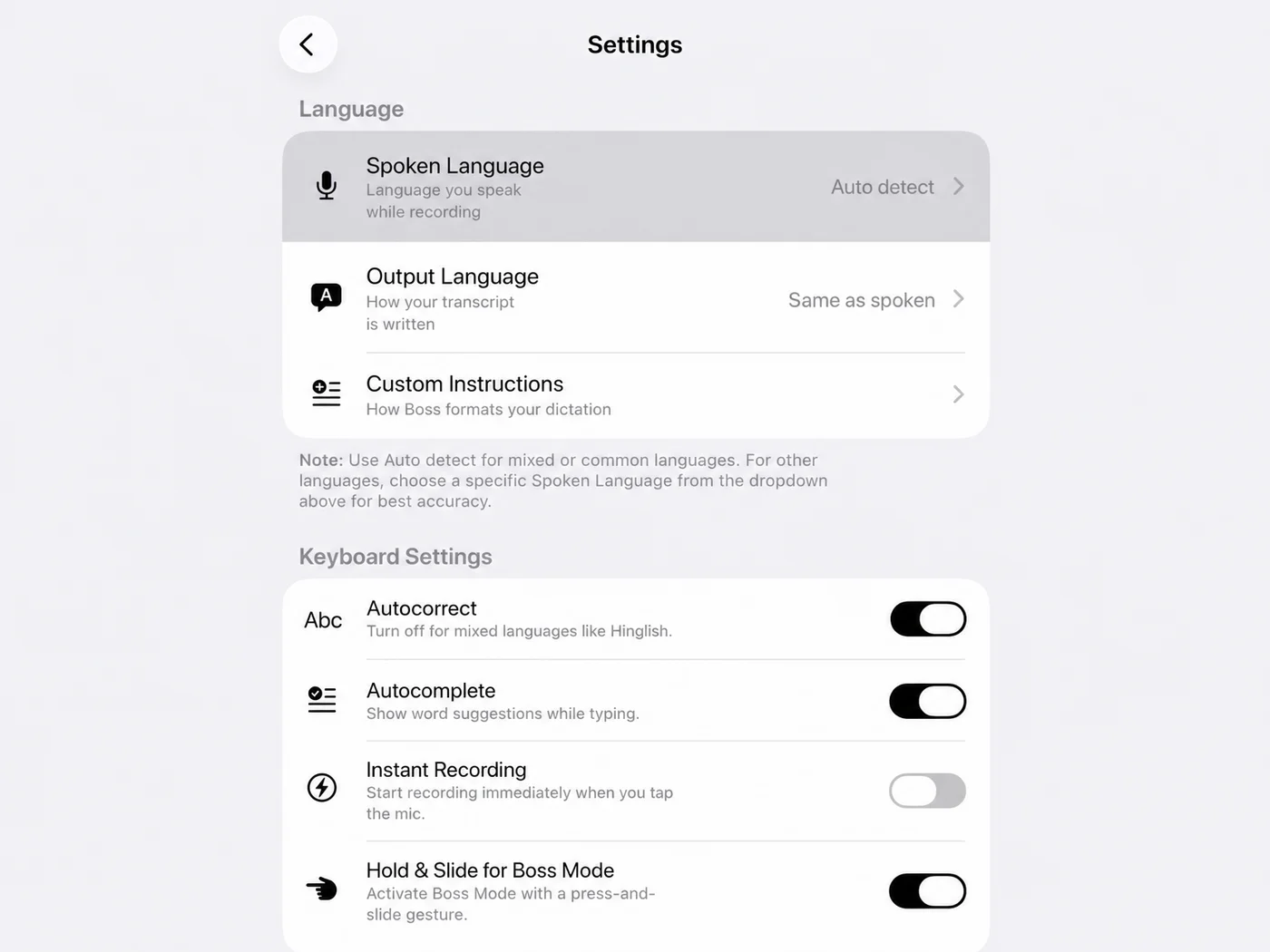 The Language & Keyboard screen: spoken language set to Auto detect, Custom Instructions, and toggles including Instant Recording and Hold & Slide for Boss Mode.
Two toggles are worth knowing. Instant Recording starts recording the moment you tap the mic (it is off by default in our screenshot), which saves a step. Hold & Slide for Boss Mode lets you trigger Boss Mode with a press-and-slide gesture, which suits some hands better than a precise tap, though you should test which feels better on a bad day.
Get Started with BossAI
If your keyboard is no longer the right tool for long writing, try dictating your next email. BossAI's free tier gives you 500 words a day with full AI quality, which is enough to see whether it fits your hands.
Not ready to try it yet? Get Our AI Productivity Guide — free tips on working faster with AI.
FAQ
What is a good keyboard for people with arthritis?
A split or wave-shaped ergonomic keyboard with light key switches, such as the Kinesis Freestyle 2 or Logitech Wave Keys, is a good starting point. It keeps wrists neutral and reduces force per keystroke. It won't reduce how much you type, so pair it with voice dictation for long writing.
Is BossAI good for hand injuries and RA?
BossAI is built for hands-free writing: you dictate, and it handles transcription, filler removal, and formatting. People with RSI, carpal tunnel, or joint pain use it to write emails and messages without typing. Starting a recording still takes a tap or a hotkey press.
Which devices does BossAI work on?
BossAI runs on iOS, Android, macOS, and Windows. On iPhone and Android it replaces the default keyboard, so you can dictate in any app. On Mac and Windows it runs in the menu bar or system tray and inserts text wherever your cursor is.
Can voice typing fully replace a keyboard with RA?
For most long writing, yes. Dictation covers emails, messages, and documents well. A keyboard is still handy for quick edits, passwords, and spreadsheets, so a hybrid setup is realistic. Use voice for volume and a comfortable ergonomic board for the small stuff.