
Follow Up Email: When to Send It & 5 Templates That Work
Most follow-up emails fail for a boring reason. They go out too early, too late, or without asking for anything. Fix the timing, the structure and the ask, and a follow up email becomes the easiest message you send all week.
Key Takeaways
- A follow up email is a short message sent after silence or a completed step, to restate your purpose and ask for one specific action.
- Typical gaps: 3-5 days for sales, 1-2 weeks after an interview or networking chat, and 24 hours for anything time-critical.
- Every follow-up has four parts: a clear subject line, a reference to the original message, a one-sentence purpose, and one call to action.
- BossAI's Boss Mode reads the email on your screen and drafts the follow-up from a spoken command, so there is no copy-pasting.
- Save your best versions as Clips and paste them in one tap, then change only the details.
What Is a Follow-Up Email?
A follow-up email is a short message you send after an earlier email, meeting, call or application to prompt a response or confirm the next step. It is not a complaint about silence. It reminds the reader of the context, restates what you need, and makes it easy to answer.
The same format covers sales outreach, job interviews, unanswered requests and post-meeting recaps. If you are replying to a message you received rather than chasing one you sent, our guide on how to reply to an email professionally covers that side. Follow-ups are for when silence or time has passed.
How Soon Should You Send a Follow Up Email?
Send a follow-up email 3-5 days after a sales message, 1-2 weeks after an interview or networking conversation, and within 24 hours for anything with a deadline. These are working rules of thumb, not measured benchmarks. Adjust them to the other person's pace and your relationship.
| Situation | Typical wait | Tone | Ask |
|---|---|---|---|
| Sales or outreach, no reply | 3-5 days | Friendly, brief | A 15-minute call |
| After a job interview | 24 hours (thank-you), then 1-2 weeks | Appreciative | Next steps and timeline |
| Networking contact | 1-2 weeks | Warm | A short chat or intro |
| After a meeting | Same day | Clear, factual | Confirm actions and owners |
| Unanswered request | 3-5 working days | Polite | Yes/no or a date |
| Urgent follow up email | 24 hours or less | Direct, courteous | A decision by a stated time |
Two more points. Skip weekends unless your industry works them. And if you have chased twice with no reply, stop and change channel instead of sending a third near-identical email.
Reality check: The numbers above are conventions, not guarantees. A recruiter who said "decisions next Friday" beats any rule on this page.
What Should a Professional Follow Up Email Include?
Include four things: a specific subject line, a one-line reference to the earlier conversation, a single sentence stating your purpose, and one clear call to action. Add a polite sign-off with your name and contact details. Anything beyond that usually lowers your chance of a reply.
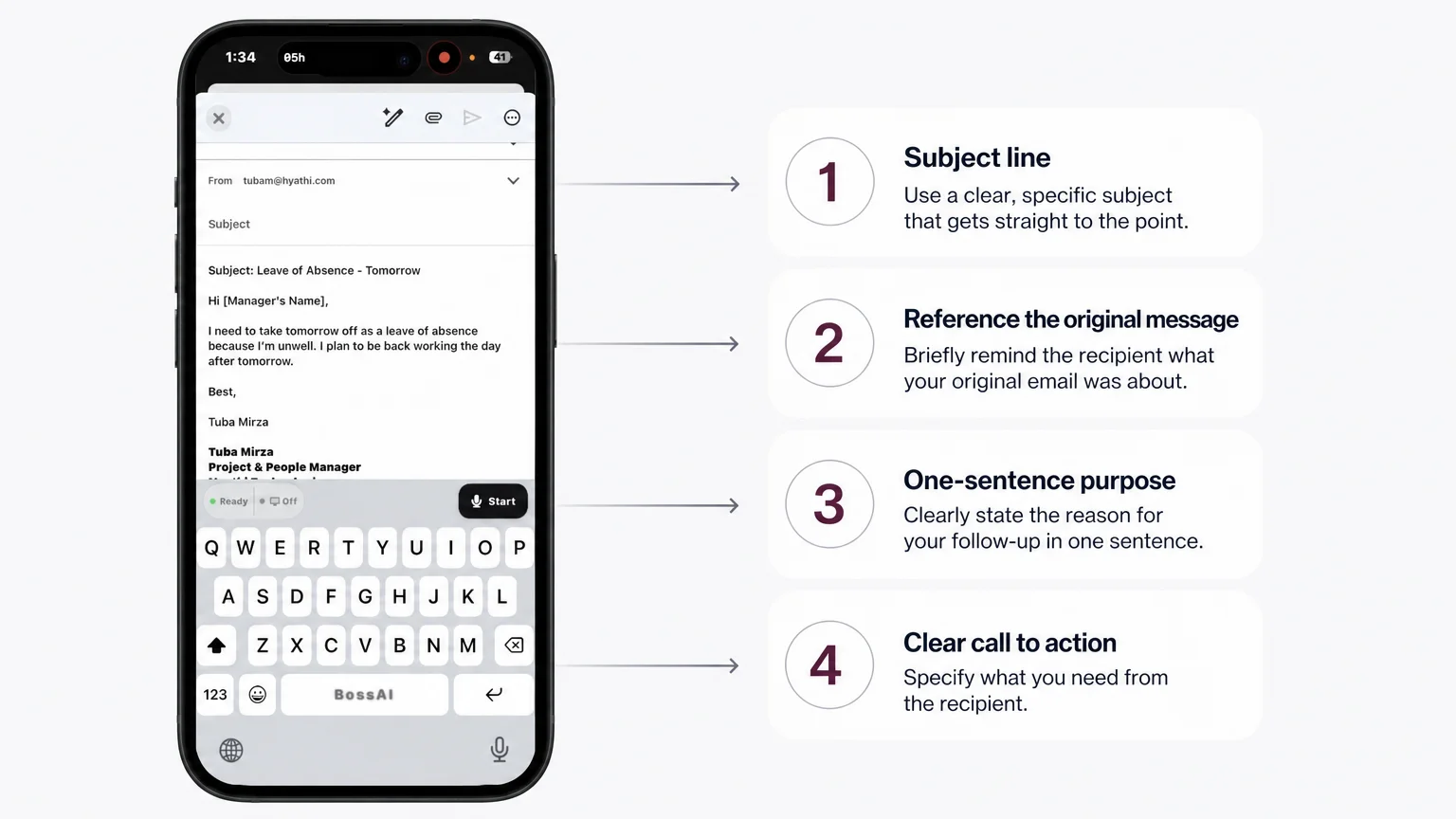 The screenshot shows an email being drafted with the BossAI keyboard; the four numbered parts apply to any follow-up.
The compose screen above holds an unrelated leave-request email, because that is the real screenshot we have. The structure is the same for a follow-up. Here is how each part works:
- Subject line: put the original topic in it, such as "Re: Proposal for Q1 website refresh". A familiar subject gets opened.
- Reference: one clause, such as "Following up on my note from Tuesday."
- Purpose: what this email is for, in a single sentence.
- Call to action: one question the reader can answer in a line, ideally with a date.
How Can You Write a Follow-Up Email That Gets a Reply?
Write a follow-up email that gets a reply by keeping it under about 100 words, asking one question, offering an easy next step, and adding something new instead of just "checking in." Make the response cost the reader as little effort as possible.
New value is the part most senders skip. A relevant article, a revised date or a one-line answer to an objection gives the reader a reason to respond. "Just checking in" gives them nothing.
Worth knowing: Replace "Just following up" with the specific thing you need. "Could you confirm Thursday works for the demo?" is far easier to answer.
Template 1: Sales follow-up email
Subject: Re: Quick question on your onboarding process
Hi [Name],
I sent a note on [day] about cutting onboarding time for your team. I know inboxes fill up, so I wanted to bring it back to the top.
Would a 15-minute call on [day] or [day] suit you?
Thanks, [Your name]
Template 2: Interview follow-up email
Subject: Thank you, [role] interview on [day]
Hi [Name],
Thank you for talking with me about the [role]. I especially enjoyed discussing [specific topic], and it made me more interested in the team.
Could you share where you are in the process and when I might expect an update?
Best, [Your name]
Template 3: No-response follow-up email
Subject: Re: [original subject]
Hi [Name],
Resurfacing my earlier email in case it got buried. In short: [one-sentence request].
A quick yes or no is enough, and I am happy to adjust if timing is the issue.
Thanks, [Your name]
Template 4: After-meeting follow-up email
Subject: Summary and next steps from today's meeting
Hi [Name],
Thanks for your time today. We agreed that [action] is owned by [person] by [date], and that [action] is owned by [person] by [date].
Please reply if I have missed anything.
Best, [Your name]
How Do You Write an Urgent Follow Up Email?
An urgent follow up email states the deadline in the subject line, explains the consequence in one sentence, and asks for a decision by a specific time. Stay courteous, because urgency comes from clarity and not from capital letters or exclamation marks.
Template 5: Urgent follow-up email
Subject: Decision needed by Thursday 3 pm: [topic]
Hi [Name],
Following up on my email from yesterday. We need your approval on [item] by Thursday at 3 pm to keep [deliverable] on schedule.
If it is easier, reply "approved" and I will take it from here.
Thank you, [Your name]
Use urgency sparingly. If every follow-up is urgent, none of them are.
Can AI Help You Write Follow-Up Emails Faster?
Yes. AI can draft a follow-up email from a short instruction, adjust its tone, and fill in details from the thread you are looking at. You still decide the timing and the ask, and you should read the draft before sending.
The usual workflow is slow, though: copy the thread, paste it into a chatbot, explain what you want, copy the answer back. AI email writers and assistants remove some of that friction, and the broader picture is in our guide to the AI email assistant. The less switching between apps, the more likely you are to actually send the follow-up.
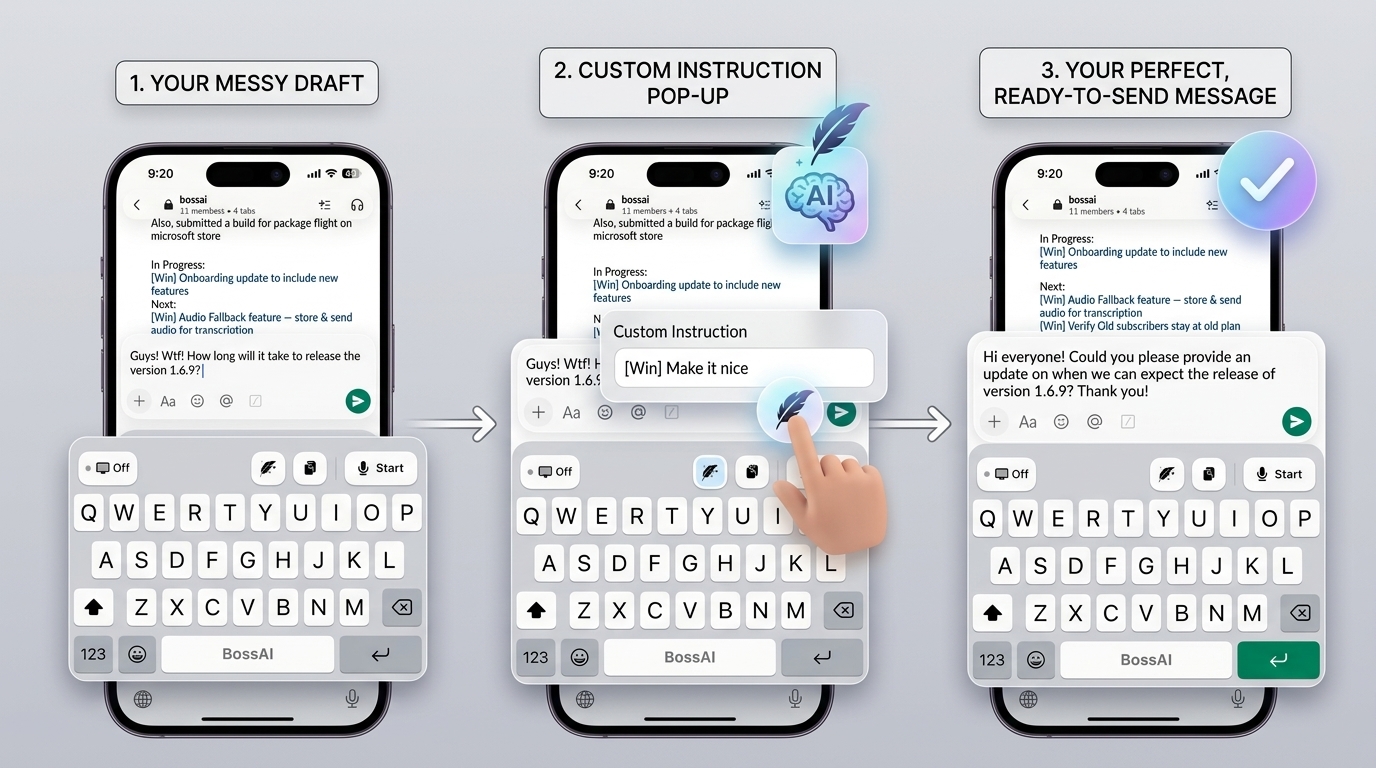 The real Rewrite flow: a blunt draft, a custom instruction entered from the feather icon, and a polished message.
Write Follow-Ups Faster with BossAI
BossAI is an AI voice keyboard for iPhone and Android, and a voice-to-text app for Mac and Windows. Its Boss Mode reads the email on your screen, so you can say "Boss, follow up on this politely" and get a contextual draft inserted into the text field.
You enable screen sharing from the host app first, which is how Boss Mode sees the thread. Then you speak the command, and the draft lands in the reply field with no copy-pasting and no app switching. For longer examples of Boss Mode and Rewrite working together, see the AI email reply generator guide.
Rewrite handles tone. In the screenshot above, a blunt draft goes through a custom instruction and comes out as a polite, ready-to-send message. BossAI's one-tap tones are Professional, Casual, Witty, Persuasive, Empathetic and Bold, so a firm chaser to a vendor and a warm nudge to a former colleague start from the same draft.
Boss Mode works the same way for follow-up emails, comments on social posts and professional replies in any app.
How Can You Save Time Writing Follow-Up Emails?
Save your best follow-up templates as snippets you can paste in one tap, then personalise only the name, date and ask. Reusing a proven structure saves time and keeps your wording consistent across dozens of contacts.
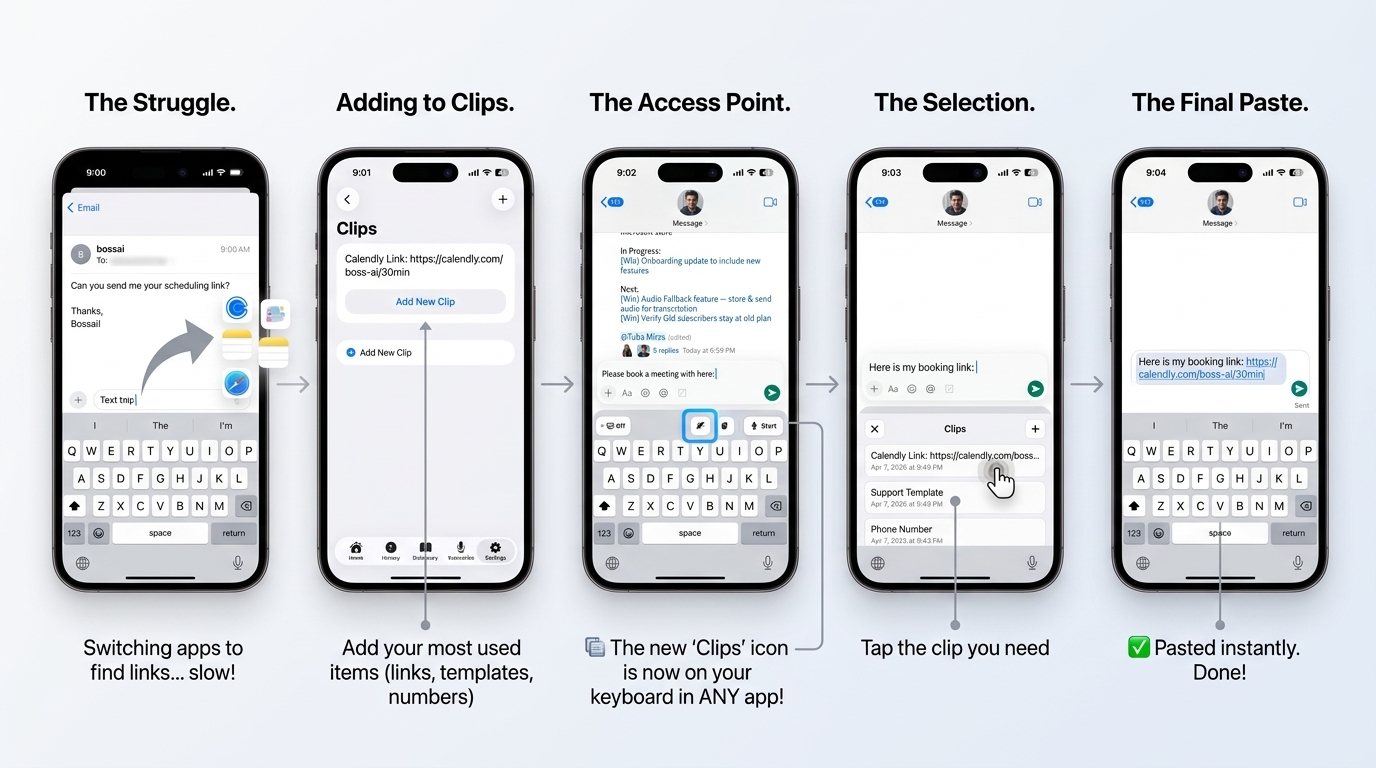 Clips in the real app: save text once, open the tray from the keyboard, tap to paste. The example item is a booking link.
BossAI's Clips store any text you reuse, and the screenshot shows the pattern with a booking link and a support template. Save your meeting link, your signature and a skeleton of Templates 1-5, then paste them from the keyboard in any app. The free plan includes two Clips and Pro unlocks all of them.
Then dictate the personal line. A spoken sentence such as "Thanks again for the intro on Tuesday" is faster than typing it on a phone, and BossAI removes the filler words as you go.
Get Started with BossAI
Follow-ups are repetitive by nature, which makes them ideal for voice, Boss Mode and saved Clips. Try BossAI on the next thread you need to chase.
FAQ
How do you politely follow up on an email?
Open with a short reference to your earlier message, state what you need in one sentence, and offer an easy way to reply, such as a yes/no or two time options. Thank the reader and avoid blame or phrases like "as I already said."
What should the subject line of a follow-up email be?
Keep the original subject and add a prefix such as "Re:" or "Following up:", or name the action you need and the date. A familiar, specific subject is opened more reliably than a vague one like "Checking in."
How many times should you follow up before giving up?
Two or three follow-ups spaced several days apart is a sensible limit for most business contexts. After that, try a different channel such as a call or LinkedIn message, or accept that the answer is no for now.
Is BossAI free for writing follow-up emails?
Yes. The free plan covers 500 words of dictation a day, one full Boss Mode reply and one Rewrite per day, two Clips and one language. Pro removes the limits for $9.99 a month or $69.99 a year, with a 7-day trial and no account needed.