AI Email Writer: Write Better Emails in Half the Time
AI Email Writer: How to Write Better Emails in Half the Time
The average professional sends 40 emails per day and spends 28% of their workweek managing their inbox. An AI email writer eliminates blank-page paralysis, tone-guessing, and repetitive typing that make email the most time-consuming communication channel in modern work.
This guide covers how AI email writers work, what separates the best tools from generic text generators, and how to build a workflow that cuts your email drafting time by more than half.
What Is an AI Email Writer?
An AI email writer is software that uses natural language processing (NLP) and large language models (LLMs) to draft, rewrite, or reply to emails based on a short prompt or existing context. Instead of staring at a blank compose window, you describe what you need — "follow up on Friday's meeting" or "decline politely" — and the AI generates a complete, send-ready email.
Modern AI email writers go beyond simple template fill-in. They analyze tone, adjust formality, maintain brand voice, and even read the email you're replying to so the response stays contextually relevant. The best tools integrate directly into your writing environment so you never leave your inbox.
How AI Email Writers Work
Most AI email tools follow a three-step process:
- Input: You provide a prompt (e.g., "write a follow-up email about the Q3 proposal"), paste in an email to reply to, or let the tool read the on-screen context automatically.
- Processing: The AI model analyzes your prompt, applies tone and formatting rules, and generates a draft. Advanced tools factor in the recipient's message, your past writing patterns, and the type of email (cold outreach, internal update, customer reply).
- Output: You receive a complete email draft with subject line, greeting, body, and sign-off. Most tools let you edit, regenerate, or adjust tone before sending.
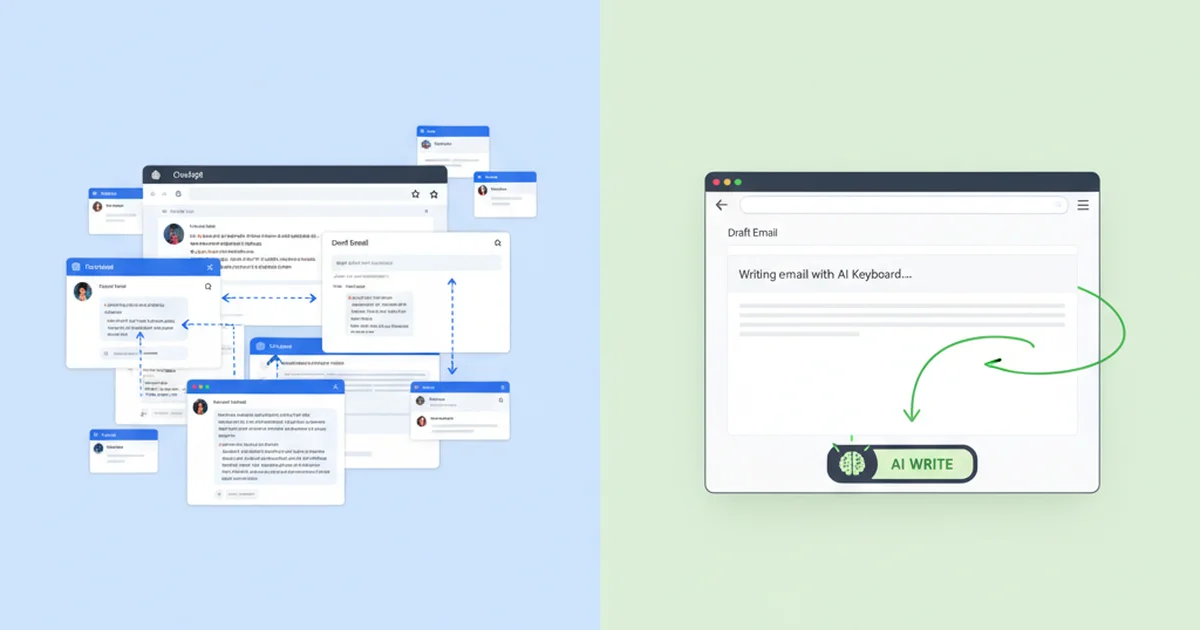
The critical differentiator between tools is where this process happens. Standalone web apps like ChatGPT or Copy.ai require you to switch tabs, paste context, copy the output, and paste it back into your inbox. Integrated tools work directly inside your email client or keyboard, removing the copy-paste loop entirely.
Why Professionals Need an AI Email Writer
Despite Slack, Teams, and a dozen other messaging platforms, email remains the default channel for client communication, sales outreach, vendor coordination, and formal correspondence. The volume keeps increasing, but the time to write thoughtful responses does not.
The Real Cost of Email
- Time drain: Professionals spend 2.5 hours per day on email according to McKinsey research — 650 hours per year, roughly 16 full work weeks.
- Context switching: Toggling between your inbox and a separate AI tool adds 20-30 seconds per email. Across 40 emails per day, that's 15-20 minutes of pure friction.
- Tone inconsistency: Writing quickly leads to tone drift. Rushed replies come across as curt. Over-explained responses waste everyone's time.
- Repetitive drafting: Follow-ups, meeting confirmations, project updates, and status requests follow predictable patterns. Writing them from scratch is unnecessary.
An AI email writer addresses all four problems: it drafts faster, works where you type, maintains consistent tone, and automates repetitive email patterns.
Types of Emails an AI Writer Can Handle
AI email writers are not limited to one format. The best tools handle the full spectrum of professional email communication:
Business and Professional Emails
- Client correspondence: Proposals, project updates, deliverable summaries
- Internal communication: Team updates, meeting agendas, policy announcements
- Vendor and partner emails: Negotiations, onboarding instructions, contract discussions
Sales and Outreach Emails
- Cold outreach: Personalized introductions based on prospect research
- Follow-ups: Timed sequences that reference previous touchpoints
- Re-engagement: Reaching out to dormant leads with new value propositions
Customer-Facing Emails
- Support replies: Resolving issues with empathy and clarity
- Onboarding sequences: Welcome emails, setup guides, feature introductions
- Feedback requests: Post-purchase or post-interaction surveys
Personal and Administrative Emails
- Scheduling: Meeting requests, rescheduling, calendar coordination
- Networking: Introduction requests, thank-you notes, event follow-ups
- Formal correspondence: Resignation letters, recommendation requests, complaints
The key is matching the AI email writer to your workflow. A marketing team sending 10,000 campaign emails needs bulk tools like Mailmeteor or HubSpot's AI. A consultant replying to 50 individual emails per day needs something that works in real time, inside the inbox, without switching apps.
How to Choose the Best AI Email Writer
Not every AI email tool fits every workflow. Here's what to evaluate before committing to one:
Speed and Integration
The fastest AI email writer is the one that requires the fewest steps between "I need to reply" and "email sent." Tools that work inside your keyboard or email client eliminate copy-pasting entirely. Tools that require a separate browser tab add friction that compounds across dozens of emails per day.
Tone and Style Control
Look for tools that offer preset tones (Professional, Casual, Persuasive, Empathetic) and let you customize voice settings. A one-size-fits-all tone generator produces generic emails that sound like every other AI-written message in the recipient's inbox.
Context Awareness
The best AI email writers read the conversation thread, understand the sender's intent, and generate replies that directly address the points raised. Without context awareness, you end up rewriting the AI's output to make it relevant — defeating the purpose.
Privacy and Security
Email often contains confidential information: financials, legal documents, personnel matters, proprietary data. Verify that the AI tool does not store, train on, or retain your email content. End-to-end processing with immediate data discarding is the gold standard.
Platform Availability
Your email writing doesn't stop at your laptop. Evaluate whether the tool works on iOS, macOS, Windows, and inside the apps where you actually compose emails — not just inside Gmail on Chrome.
AI Email Writer Comparison: Standalone Tools vs. Integrated Solutions
Most AI email writers fall into two categories: standalone web tools and integrated solutions. The difference matters more than feature lists suggest.
| Feature | Standalone Tools (ChatGPT, Copy.ai, Jasper) | Email-Specific Tools (Flowrite, Superhuman AI) | Keyboard-Integrated Tools (BossAI) |
|---|---|---|---|
| Works inside your inbox | No — requires tab switching | Yes — but only in supported email clients | Yes — works in every app on your device |
| Context awareness | Manual — you paste the email thread | Partial — reads the current email | Full — reads your entire screen in real time |
| Tone presets | Requires prompt engineering | Limited preset options | One-tap tone selection (6 built-in tones) |
| Voice input | No | No | Yes — type with voice instead of typing |
| Mobile support | Browser only | App-dependent | Native iOS keyboard, macOS, Windows |
| Setup required | Account + new tab per email | Extension or app install | Enable keyboard — works everywhere |
| Avg. time per email | 45-60 seconds (copy-paste loop) | 15-25 seconds | 5-15 seconds (voice + auto-context) |
Standalone tools are powerful for one-off long-form emails where you have time to craft a detailed prompt. For the daily grind of 30-50 emails, integrated solutions save meaningful time because they remove the workflow interruption.
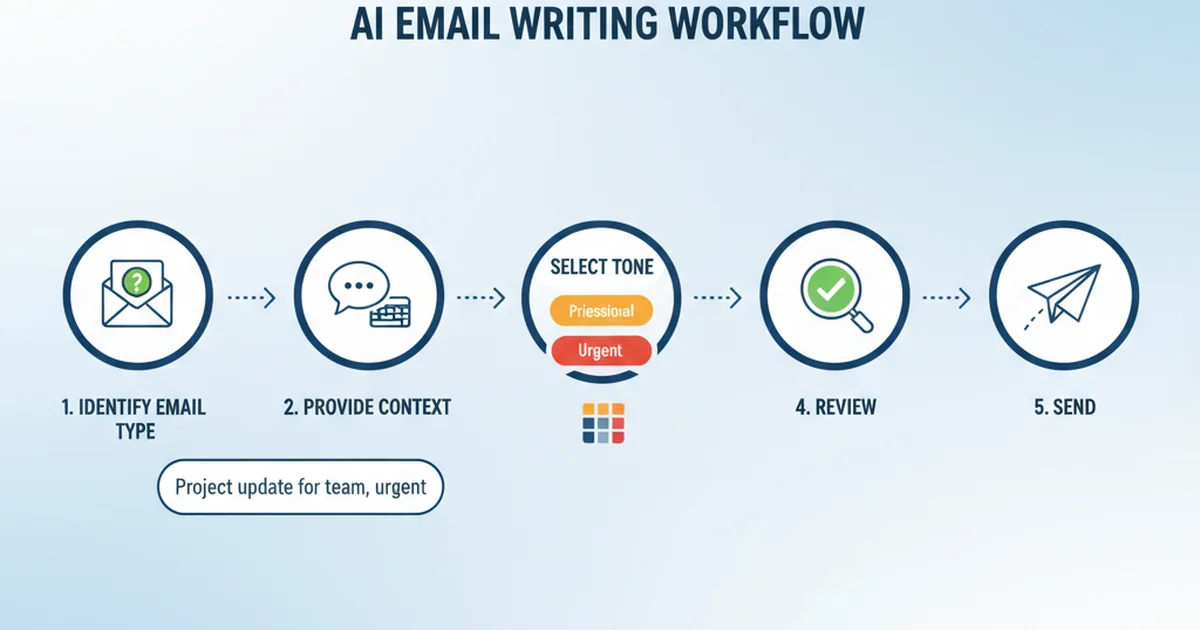
Writing Emails with AI: A Step-by-Step Workflow
Here's a practical workflow for using an AI email writer effectively, whether you choose a standalone tool or an integrated solution.
Step 1: Identify the Email Type
Categorize before generating: cold outreach, reply, follow-up, internal update, or formal request. This determines the tone, length, and structure the AI should target.
Step 2: Provide Context
The quality of AI output depends entirely on context. The more specific your input, the better the result:
- Weak prompt: "Write an email to John"
- Strong prompt: "Follow-up email to John referencing our Tuesday call about the Q3 budget. Confirm the $45K figure and ask when his team can start."
If your AI email tool reads screen context automatically — like BossAI's Boss Mode — this step happens automatically. You simply type with voice: "Boss, reply confirming the budget and asking for a timeline" and the AI handles the rest.
Step 3: Select Your Tone
Match tone to the recipient: Professional for clients and first contacts, Casual for internal teams, Persuasive for sales and proposals, Empathetic for complaints and sensitive topics. Tools with one-tap tone selection make this instant.
Step 4: Review and Personalize
AI-generated emails are 90% there. The last 10% — a personal reference, a specific detail, a closing that matches your style — makes the email feel human. Check that names, dates, and figures are accurate, the call-to-action matches your goal, and you'd send it with your name on it.
Step 5: Send and Save Patterns
When a prompt consistently produces great results, save it. BossAI's Clips feature stores frequently used email templates, signatures, and standard replies directly in your keyboard for one-tap access.
AI Email Writer for Specific Use Cases
AI Email Reply Generator
Replying is where AI email writers deliver the most time savings. A reply requires understanding the sender's message, identifying the key points, and crafting a response that addresses each one. Without AI, this analysis-and-drafting loop takes 3-5 minutes per complex email.
An AI email reply generator reads the incoming message, extracts the action items or questions, and drafts a point-by-point response. The best tools do this without you copying the original email — they read it directly from your screen or email thread.
For professionals handling 20+ replies per day, this single feature can save 60-90 minutes daily.
AI Email Composer for Cold Outreach
Cold emails live or die on personalization. Generic "I'd love to connect" messages get deleted. AI email composers that pull in prospect data can generate personalized openers referencing the recipient's company or recent news. Personalized AI emails see 8-12% reply rates vs. 1-3% for generic templates, and drafting drops from 5-8 minutes to 30 seconds.
AI Email Writer for Customer Support
Support emails require empathy, clarity, and efficiency. AI email writers trained on support patterns acknowledge customer frustration before presenting solutions, maintain consistent brand voice across the team, and suggest escalation when issues exceed standard resolution.
How BossAI Works as an AI Email Writer
BossAI takes a fundamentally different approach to AI email writing. Instead of being a separate app you copy-paste from, BossAI is a keyboard with built-in AI that lives where you type — directly inside your email app on iOS, in your menu bar on Mac, and in your system tray on Windows.
Voice-First Email Composition
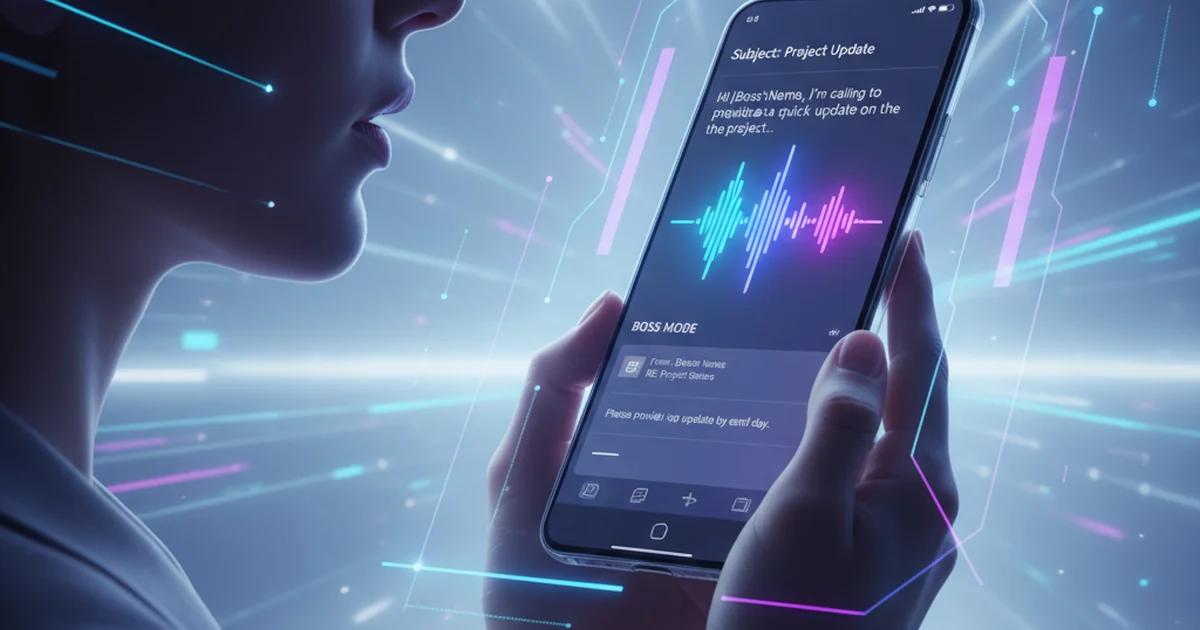
Most AI email writers require you to type a prompt. BossAI lets you speak it. Hold the microphone button and say: "Email to Sarah confirming the Thursday 2pm meeting and asking her to bring the design mockups." BossAI transcribes your speech, removes filler words (um, uh, like), fixes grammar and punctuation, and formats it as a proper email — all in real time.
For professionals who think faster than they type, voice typing replaces manual email drafting entirely. What takes 3 minutes to type takes 30 seconds to speak.
Boss Mode: Screen-Aware Email Replies
BossAI's Boss Mode is the feature no other AI email tool offers. When you're looking at an email and need to reply, say: "Boss, reply to this email professionally and confirm the Friday deadline." BossAI reads your screen, understands the email you're replying to, and generates a contextually accurate response — all without you copying, pasting, or explaining what's on screen.
This works in every email app: Apple Mail, Gmail (Safari or Chrome), Outlook, Spark, and any other email client on iOS, Mac, or Windows.
One-Tap Tone Rewriting
Wrote a quick reply but it sounds too blunt? Tap "Professional" and BossAI rewrites it with polished, client-ready language. Need to soften a rejection? Tap "Empathetic." Want to make a sales email more compelling? Tap "Persuasive."
Six built-in tones — Professional, Casual, Witty, Persuasive, Empathetic, and Bold — let you change your email tone without rewriting from scratch. Each tone rewrites the entire email while preserving your core message and specific details.
Clips for Repetitive Emails
Email signatures, meeting links, standard acknowledgments, payment details, FAQ responses — these fragments appear in emails dozens of times per week. BossAI's Clips feature stores them inside your keyboard. One tap inserts any saved clip directly into your email without switching apps or opening a clipboard manager.
AI Email Writer vs. ChatGPT: Key Differences
ChatGPT is the most commonly used AI for email writing, but it wasn't designed for the task. Here's how purpose-built AI email writers differ:
| Aspect | ChatGPT | Purpose-Built AI Email Writer |
|---|---|---|
| Workflow | Open new tab → type prompt → copy output → paste into email | Write directly in your email app |
| Context | You explain the email thread manually | Reads the email thread or screen automatically |
| Tone control | Prompt-based ("make it professional") | One-tap tone presets |
| Speed per email | 45-90 seconds | 5-20 seconds |
| Mobile experience | Poor (browser-based, no keyboard integration) | Native keyboard or app |
| Email-specific formatting | Inconsistent (may add headers, bullets, markdown) | Formatted for email by default |
| Saved templates | Manual (save prompts somewhere else) | Built-in clips and templates |
ChatGPT excels at complex, one-off emails where you need extensive back-and-forth refinement. For daily email volume — the 30-50 routine messages that consume your afternoon — a dedicated AI email writer integrated into your keyboard or inbox is measurably faster.
Tips for Getting Better Results from AI Email Writers
Be Specific with Prompts
"Write an email" produces generic output. "Write a 3-sentence follow-up to a procurement manager who asked for a 15% discount on our annual plan, declining politely but offering a 10% discount for a 2-year commitment" produces a send-ready email.
Include: recipient role, relationship context, key points to cover, desired outcome, and tone preference.
Keep Subject Lines Short and Specific
AI-generated subject lines tend toward the verbose. Edit them to under 50 characters. "Q3 Budget Follow-Up — Action Needed" outperforms "Following Up on Our Recent Conversation About the Q3 Budget Proposal."
Don't Over-Rely on AI for Relationship Emails
High-stakes emails — apologies, negotiations, promotions, terminations — benefit from AI drafting but require genuine personal input. Use AI for the structure and initial draft, then rewrite critical sections in your own voice.
Build a Personal Prompt Library
Track which prompts consistently produce great results. Save them as clips or templates. Over time, you'll build a personal library that makes AI email writing nearly instantaneous for your most common email types.
Review Every Email Before Sending
AI occasionally hallucinates details, uses outdated information, or strikes the wrong tone. A 10-second review before hitting send prevents embarrassing mistakes. Check names, dates, figures, and the overall tone against your intent.
Privacy and Security in AI Email Writing
Email contains sensitive information: financial data, legal discussions, personnel decisions, proprietary strategy. Before using any AI email writer, verify these practices:
- Data retention: The gold standard is zero-retention — processing in real time with immediate data discarding.
- Training exclusion: Confirm the tool does not use your email content to train its AI models.
- Encryption: Look for end-to-end encryption during processing.
- Compliance: For regulated industries, verify HIPAA, SOC 2, or relevant certifications.
BossAI processes all voice and text data in real time with no server-side storage. Your email content is never retained, logged, or used for model training.
Frequently Asked Questions About AI Email Writers
What is the best AI email writer for professionals?
The best AI email writer for professionals is one that integrates directly into your typing workflow rather than requiring app switching. BossAI works as a keyboard on iOS and a background app on Mac and Windows, enabling voice-to-email composition, screen-aware replies via Boss Mode, and one-tap tone adjustment across every email client — eliminating the copy-paste loop that standalone tools like ChatGPT require.
Can AI write emails that sound human?
Modern AI email writers produce emails indistinguishable from human-written messages when given sufficient context. The key factors are: providing specific details about the recipient, selecting the appropriate tone, and adding personal touches during review. Detailed prompts produce natural, personalized messages; generic prompts produce generic output.
Is it safe to use AI for confidential emails?
Safety depends entirely on the tool's data handling practices. Look for AI email writers that process data in real time without storing email content on servers. Avoid tools that retain your data for model training. BossAI discards all processed text immediately after generation, with no server-side storage of your email content.
How much time does an AI email writer save?
An AI email writer saves 1-2 hours per day for professionals who send 30 or more emails daily. Individual email drafting drops from 3-5 minutes (manual typing) to 15-45 seconds (AI-assisted), depending on the tool and complexity. Integrated tools that eliminate copy-pasting save an additional 15-20 minutes per day over standalone solutions.
Can AI email writers handle multiple languages?
Most advanced AI email writers support multilingual composition. BossAI supports dictation and email generation in multiple languages, allowing users to compose emails in their preferred language and translate or adjust tone without switching tools. This is particularly valuable for professionals communicating across international teams.
Should I edit AI-generated emails before sending?
Always review AI-generated emails before sending, even when the output looks polished. Check for accuracy of names, dates, and figures; verify the tone matches your relationship with the recipient; and add personal details that make the email feel genuine. AI handles the structure and drafting — you provide the final human touch.
How is an AI email writer different from email templates?
Templates are static text with placeholders. AI email writers generate unique content for each email based on context, tone, and prompt. Templates work for highly repetitive messages (order confirmations, meeting reminders). AI writers excel where every email needs to be contextually relevant — replies, outreach, negotiations, and any message requiring understanding of the conversation history.
Visual References