

Dictation for Doctors: Phone Setup for Emails & Letters
Ten minutes between patients is not enough to type a referral letter with your thumbs. It is plenty to say one out loud. That gap is where dictation for doctors earns its place, and it is the part of the workday this guide covers.
Key Takeaways
- Dictation for doctors is most useful for non-chart writing: emails, referral letters, patient follow-up messages that go out by message, and internal replies.
- BossAI works in any text field on iPhone, Android, Mac and Windows. It is a general dictation keyboard, not an EHR or an AI scribe.
- The Custom Dictionary lets you add drug names, clinical abbreviations and colleague names so they are written the way you spell them.
- Check your employer's policy before dictating anything patient-related. This article makes no HIPAA, PHI or clinical-accuracy claims.
- BossAI does not store voice or text data on its servers. Processing happens in real time and is immediately discarded.
Contents
- What Is Dictation for Doctors, and Where Does It Save Time?
- Can Doctors Use Dictation for Emails and Referral Letters?
- How Can Doctors Dictate Messages Faster on a Phone?
- How Do You Teach Dictation the Terms You Use Every Day?
- What Should Doctors Check Before Using Dictation at Work?
- Does Dictation for Doctors Fit a Busy Clinic Day?
- Get Started with BossAI
- FAQ
What Is Dictation for Doctors, and Where Does It Save Time?
Dictation for doctors means speaking your writing instead of typing it, and having software turn the speech into clean text. It covers two different jobs: clinical documentation inside a records system, and everyday writing such as emails, letters and messages. This guide is about the second job.
The first job belongs to dedicated medical dictation and documentation products, which are built around charts and templates. If you are comparing those, the medical dictation software guide lists the tools. For a plain-language primer on how speech recognition is used in medicine, see medical voice recognition software.
The second job is where a lot of unbilled time goes. Replying to a colleague, confirming a plan with a practice manager, answering a question from a referring clinician. None of that lives in a chart, and all of it still needs writing.
Worth knowing: Dictation is a typing replacement, not a documentation system. It writes what you say into whatever text field is open, and nothing more.
Can Doctors Use Dictation for Emails and Referral Letters?
Yes, as long as your employer allows it for the content in question. A dictation keyboard types into any email app, so a referral letter, a reply to a colleague or a message to an administrator can be spoken instead of typed. What you can dictate is a policy question, not a technical one.
The mechanics are simple. You open a new email, switch to the voice keyboard, and talk through the message as you would to a colleague standing next to you. The software removes filler words, fixes grammar and adds punctuation, so the draft is closer to send-ready than a raw transcript.
Good candidates for dictation:
- Referral and cover letters you would otherwise type from scratch
- Replies to colleagues, secretaries and practice managers
- Follow-up messages that go out by email or messaging app
- Meeting notes and reminders to yourself
- Teaching and supervision feedback
Poor candidates are anything you are not permitted to put in that app or channel. That is a workplace rule, and the section on policy below covers it.
How Can Doctors Dictate Messages Faster on a Phone?
Switch your phone to a dictation keyboard, tap the microphone, speak the whole message, then read it once before sending. On BossAI the keyboard works in any app, so the same steps cover email, chat and notes. The review step matters more than the speaking.
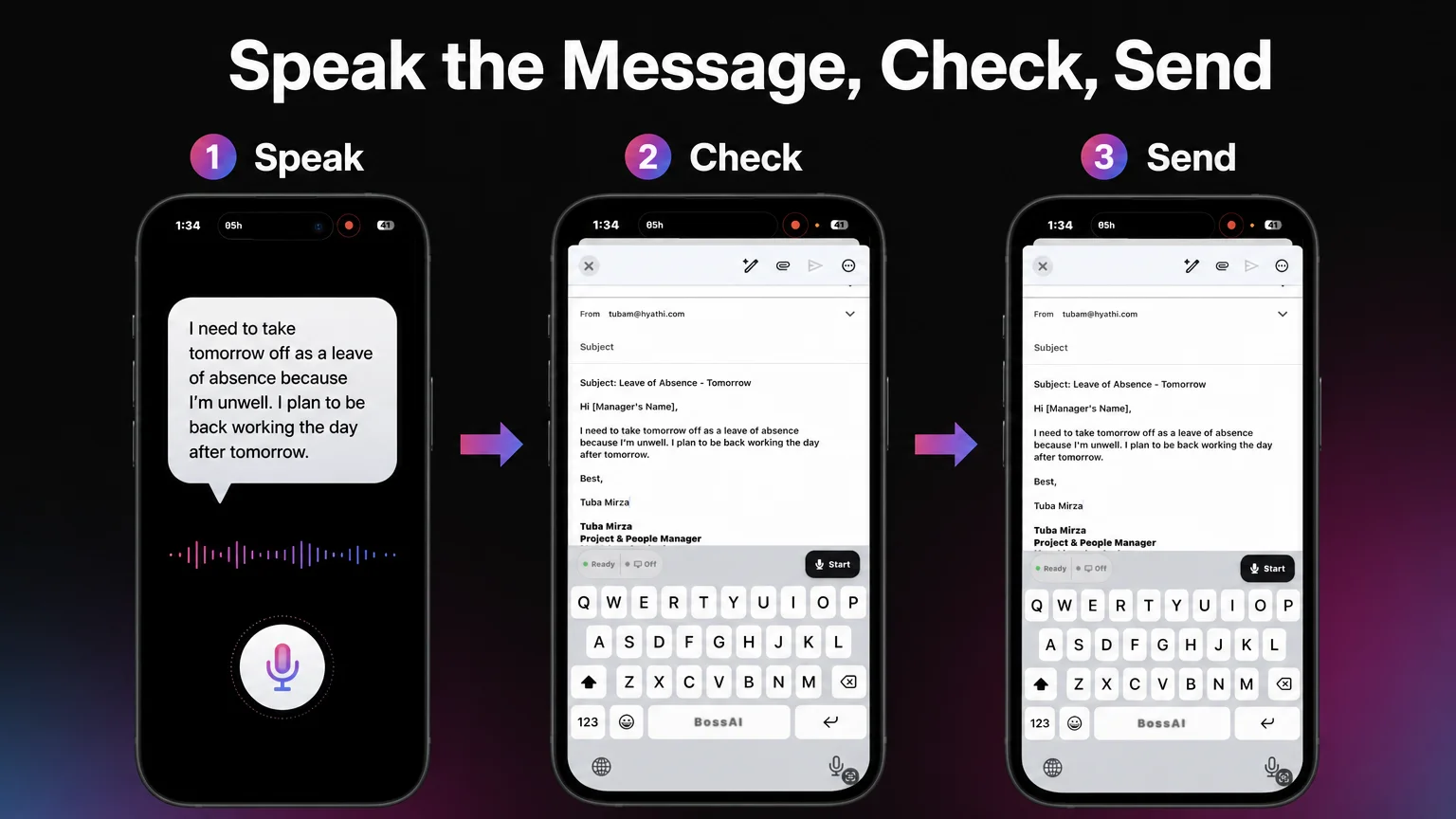 A real iPhone email compose with the BossAI keyboard: the Start button is on the keyboard, and the dictated text sits in the message body.
The screenshot above is a plain, non-clinical email: a short leave-of-absence message in an iOS compose window. The BossAI keyboard sits underneath with its Ready status and a dark Start button.
That is how a dictated message appears in a normal text field. It is not a chart or EHR screen.
Here is a practical starting routine:
- Enable the keyboard once. On iPhone, add BossAI in Settings → Keyboards. On Android, enable it in your phone's keyboard settings; the path varies by manufacturer.
- Open the message. Any email, chat or notes app works.
- Start dictating. Tap Start on the keyboard. On iPhone you can also start from the Action Button or, on older iPhones, with Back Tap, without opening BossAI first.
- Speak in full sentences. Say punctuation if you like, but you do not need to.
- Read before you send. Check names, doses and numbers by eye every time.
Pro tip: If you send the same sign-off or practice address often, save it as a Clip on the keyboard and paste it in one tap rather than dictating it each time.
On a Mac or Windows PC, BossAI runs as a hotkey app instead of a keyboard. Push-to-talk suits short phrases, and hands-free mode suits longer letters. If you are still choosing between paid medical tools, the Dragon Medical cost breakdown shows what per-seat pricing looks like.
How Do You Teach Dictation the Terms You Use Every Day?
Use the Custom Dictionary. Add the drug names, abbreviations, clinic names and colleague names you say often, and BossAI will write them as you entered them. The free plan holds 10 words, and Pro lifts that limit, so start with the terms that go wrong most.
 Build the list from the words you actually say, not from a textbook.
General speech engines handle everyday English well. They stumble on the specific stuff: a rare drug name, a colleague's surname, the abbreviation your department uses. Those are exactly the words worth adding.
A sensible way to build the list:
- Week one: add every proper noun that came out wrong, such as colleagues, clinics and hospitals.
- Next: add the three or four drug or procedure names you dictate most.
- Then: add department abbreviations you want written in a particular form.
Test each new entry by saying it in a normal sentence, not alone. If a word still comes out wrong, you will see it in your first read-through, which is why that step never goes away. No dictionary replaces checking the output.
What Should Doctors Check Before Using Dictation at Work?
Check your employer's policy on approved apps, on what you may put in email or messaging, and on patient-related information in particular. Then confirm what the tool does with your audio and text. Do this before you dictate anything about a patient.
 Policy first, tool second.
This article makes no HIPAA, PHI or clinical-accuracy claims, and BossAI is not marketed as a clinical documentation product. It is a general dictation keyboard. Whether you may use it for a given message is decided by your employer, your regulator and your local rules.
A short checklist to take to your IT or compliance team:
- Is a third-party keyboard or dictation app allowed on this device?
- Which channels may carry patient-related content, and which may not?
- Do I need a signed agreement with the vendor before any patient data touches the tool?
- Who reviews and owns text that was dictated?
On the vendor side, BossAI states that no voice or text data is stored on its servers; processing happens in real time and is immediately discarded. Treat that as one input to your compliance review, not as a replacement for it. If your organisation needs a dedicated compliance-backed product, the comparison of Dragon Medical alternatives is a better starting point.
Reality check: If you are unsure whether a message is allowed, do not dictate it until you have asked. Asking takes a minute.
Does Dictation for Doctors Fit a Busy Clinic Day?
It fits best in the gaps: the walk between rooms, the minutes before a list starts, the end of a session. Dictation for doctors works when you can speak a message in one go, glance over it, and send. It works less well in loud, shared spaces.
Be realistic about where it helps. A quick reply while walking is easy.
A long, detailed letter is better dictated in a quiet room, where you can also read it properly. Background noise raises the chance of odd words, so look more closely.
Three habits keep it fast:
- Dictate whole thoughts. Pausing mid-sentence to think produces choppier text.
- Review at the end. One read-through beats correcting as you go.
- Keep a vocabulary list open. Add words to the Custom Dictionary the moment they fail.
The same pattern works outside medicine. If you are curious how it plays out in other professions, the angle for lawyers is covered in our dictation for lawyers guide, and busy consultants dictating between meetings face very similar constraints.
Get Started with BossAI
BossAI is a free-to-try voice keyboard for iPhone and Android, with Mac and Windows apps, that turns spoken emails and letters into clean text. The free plan includes 500 words a day, which is enough to test it on a week of real messages.
FAQ
Is dictation for doctors the same as an AI scribe?
No. An AI scribe listens to a patient encounter and drafts clinical notes. A dictation keyboard like BossAI only types what you speak into a text field, and it is not an EHR.
Can I dictate referral letters on my phone?
Yes, if your employer permits it. Open the email or document, switch to the voice keyboard, and speak the letter in full sentences. Read it through before sending, and check names and numbers by eye.
How do I make dictation spell drug names correctly?
Add them to the Custom Dictionary, which saves names, technical terms and jargon so they are written as you entered them. The free plan holds 10 words, and Pro removes the limit. Always proofread.
Does BossAI store my voice or text?
BossAI says no voice or text data is stored on its servers. Processing happens in real time and is immediately discarded. Check this against your employer's requirements before dictating anything patient-related.
What does BossAI cost?
The free plan gives 500 words a day with one dictation language. Pro is $9.99 a month, $69.99 a year or $149.99 once, and includes a 7-day trial. One Pro plan covers iOS, Android, macOS and Windows.